
Learning games / Typing Games for Kids
Typing games for kids
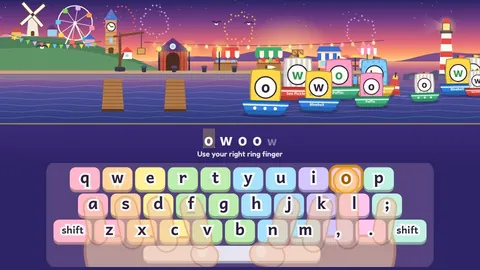
Boats sail into a harbor with a letter on each sail, and your child docks them by pressing the right key with the right finger. Short lessons build real touch typing, from the home row all the way to whole sentences.
Typing game for kids
From the home row to whole sentences · 1 game
When should kids learn to type?
Most schools start keyboarding around 2nd or 3rd grade. By then kids know their letters well, and their hands are big enough to rest on the home row. From 3rd grade on, more and more writing, research and testing happens on a keyboard, so typing quickly and accurately starts to matter for schoolwork.
The best time to learn is before hunt and peck becomes a habit. A child who types with two fingers while looking at the keys can get surprisingly quick, but it's hard to unlearn later. A few minutes a day with the right fingers pays off for years.
What kids practice
- The home row. Eight fingers resting on A S D F and J K L ;, using the little bumps on F and J to find home without looking.
- The right finger for every letter. Reaching up to the top row and down to the bottom row, then back home again.
- The space bar, Shift and punctuation. Thumbs for spaces, the other hand's pinky on Shift for capital letters, plus the comma and the period.
- Words and sentences. Real words first, then short sentences with a capital at the start and a period at the end.
- Accuracy before speed. Careful typing comes first. Speed grows on its own once the fingers know where to go.
How Home Row Harbor teaches typing
In Home Row Harbor, a toy keyboard sits under the harbor with two drawn helper hands. The finger to use glows and reaches for the key, and each finger has its own color zone on the keyboard, so kids learn which finger goes where without a chart.
Each lesson takes about two to three minutes and has four short parts: meet the two new keys slowly, mix them with keys learned before, type whole words, then send a convoy of words into the harbor. The lessons go in the order typing teachers use: F and J first, then outward across the home row, then the top row, the bottom row, capitals and full sentences. Every finished lesson adds a new piece to your child's harbor.
A wrong key never sinks a boat. The boat wobbles and waits, the right key and finger light up, and a short hint says which finger to use. Stars are for careful typing, not speed. A small speed meter shows words a minute with a gold star at your child's own best, and long pauses to think don't count against them. There are no races, no timers and no other players to compare with.
Tips for grown-ups
- Little and often. Ten minutes a day works better than an hour on Saturday. One or two lessons is plenty.
- Sit like a typist. Feet flat, back tall, wrists floating just above the keyboard and the screen at eye level.
- Eyes up. Once the home row feels familiar, try a light cloth over the hands so eyes stay on the screen.
- Praise careful, not fast. Ask about stars for accuracy before asking about speed.
- Type for real. A shopping list, a note to a grandparent or a few lines of a story all count as practice.
Before and alongside typing
Typing goes faster when spelling is strong, because kids aren't stopping to think about every letter. Our spelling games for kids practice the patterns that come up most, and younger children who are still learning letters can start with phonics games. Our learning games have no ads, no accounts, no chat and no purchases, and they don't use analytics. Progress stays in the browser on your device. See all our learning games for more.
Questions
What age should kids start learning to type?
Around age 7 or 8, or 2nd to 3rd grade, is a good time for most kids. Home Row Harbor is made for ages 7 to 12.
Can my child learn to type on a tablet?
Touch typing needs a real keyboard, so a computer, a Chromebook or a tablet with a keyboard works best. On a phone or a tablet without a keyboard, kids can still learn where the keys and fingers go.
How fast should my child type?
Accuracy matters more than speed while kids are learning. Once the right fingers are a habit, speed comes on its own. Home Row Harbor only compares your child with their own best.
Is this typing game free?
Yes. It's free in the browser with no ads, no purchases and nothing to download.
Is it safe for kids?
Yes. No ads, no accounts, no chat and no tracking. Progress is saved only on your device.