Learning games / Home Row Harbor / Guide
Home Row Harbor
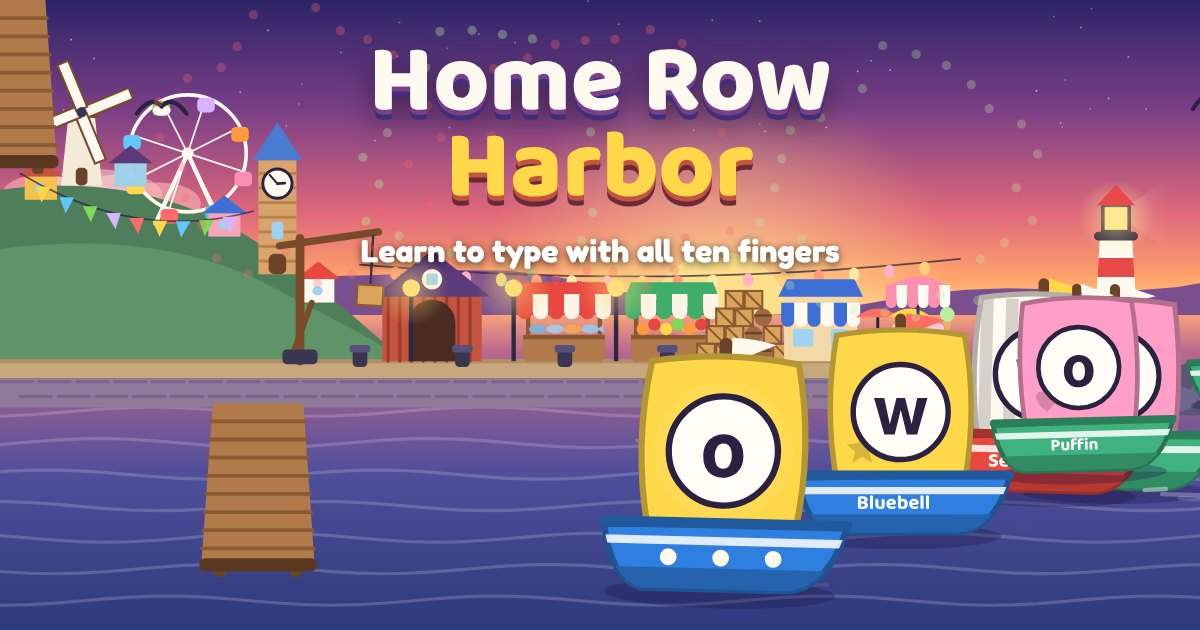
Home Row Harbor teaches touch typing one row at a time. Boats sail into a sunset harbor with a letter or a word on the sail, and your child types it to bring each boat in. Drawn helper hands show which finger to use, nothing ever sinks or runs out of time, and every lesson builds something new in the harbor, from the first wooden dock to a lighthouse and a Ferris wheel.
Quick answers
Is Home Row Harbor free?
Yes. Home Row Harbor is free to play in the browser, with no ads, no accounts and no tracking. There is nothing to buy and nothing to download.
Does Home Row Harbor work on a tablet or phone?
Yes. It plays with touch on tablets and phones, and with a mouse on a computer. There is nothing to download.
Do kids need an account to play Home Row Harbor?
No. Our learning games have no accounts at all, so there is nothing to sign up for. Progress and stickers stay on the device they play on.
What your child practices
- The home row: eight fingers resting on A S D F and J K L ;, with the little bumps on F and J to find home without looking.
- The right finger for every letter, reaching up to the top row and down to the bottom row and back home again.
- The space bar, Shift and punctuation: thumbs for spaces, the other hand's pinky on Shift for capital letters, plus the comma and the period.
- Words and short sentences, typed accurately first, so speed can grow on its own. Keyboarding is part of the Common Core writing standards for Grades 3 to 6 (W.3.6 to W.6.6).
How to play
Boats sail into the harbor and wait in a line, each with a letter on its sail. Type the letter on the front boat and it glides to the dock, a crate hops onto the quay and the key plays the next note of a little sea tune. The next boats are already waiting, so your child can read ahead and keep a steady rhythm.
Under the harbor is a toy keyboard with two drawn helper hands. The finger to use glows and actually reaches for the key, and the key itself glows too. Keys are colored by finger, so each finger has its own color zone.
Each lesson has four short parts: Meet the keys (the two new keys, slowly), Busy harbor (new keys mixed with keys learned before), Word boats (type a real word, then press the space bar to send the boat in) and a Convoy, a short line of words with one boat for each word.
There are 17 lessons: F and J, D and K, S and L, A and ;, G and H, then the top row, the bottom row, capital letters with Shift and finally whole sentences with a capital at the start and a period at the end.
Kind with mistakes
A wrong key never sinks a boat or costs anything. The boat gives a little wobble and waits, the right key and finger light up, and a short hint says which finger to use (for example, Use your left ring finger). After two misses in a row the hint is read aloud. If your child presses the matching key on the wrong hand, the hint says Other hand!
Stars at the end of a lesson are for careful typing: the share of keys pressed right the first time. Every lesson still finishes and still builds its harbor piece, so a tricky lesson is never a dead end.
Speed without pressure
A small sail speed meter shows words a minute while typing, with a gold star at your child's own best. Long pauses to think are not counted against them. The only comparison is with themselves: there are no races, no timers and no other players.
How it adapts
The game keeps track of every key: how often it is right and how quickly it is found. Keys that are missed or slow sail in more often, and keys that are steady come back now and then for review, a little later each time. Words are picked to use the newest and trickiest keys, and words get longer as accuracy grows.
After lesson 4, Open Sea offers free practice with letters, words or phrases using only the keys learned so far. Today's Tide is a short mix built from your child's trickiest keys plus a line of the day. Skipping a day never loses anything.
Build a harbor, paint your boats
Every finished lesson adds a piece to the harbor: a wooden dock, harbor lamps, a lighthouse with a sweeping beam, a fish market, a cafe, a windmill, a clock tower, a Ferris wheel and, at the very end, a fireworks raft. Crates stack up on the quay as more letters are typed.
In My Boats your child paints the hull, the sail, a sail pattern and a flag, and names each boat by typing the name, which is more typing practice. New paints and patterns open with lessons, and new boat slips open after lessons 2, 6, 10 and 14. Your child's own boats are the ones that carry the letters in every lesson.
Phones and tablets
Typing is best learned on a real keyboard, and the game says so. On a phone or tablet without a keyboard it switches to Key Finder: your child taps the keys on a big drawn keyboard to learn where each letter lives and which finger it belongs to. As soon as a keyboard is used (a tablet keyboard works too), the game notices and switches over.
For grown-ups
Press and hold For grown-ups on the title screen to see lessons and stars, keys right the first time, best speed, letters typed and a key map colored by accuracy, with the keys that need practice. You can turn the helper hands off, pick their color, show capital letters on the keys like a real keyboard, turn off finger colors, open all lessons or start over.
Tips
- Rest fingers on the home row before each lesson and feel the bumps on F and J.
- Eyes on the screen, not on the hands. The helper hands are there so your child does not need to look down.
- Go slow and steady. Careful typing earns the stars, and speed follows.
- Try the Word boats again in Open Sea when a lesson felt hard.
Tips for grown-ups
- One lesson a day is plenty. Short, regular practice builds finger memory best.
- Check the key map now and then and celebrate keys that turned green.
- Sit tall with feet flat and wrists floating just above the keys.
- Let your child type a short note, a shopping list or a story title for real once a few rows are learned.
Privacy and safety
Home Row Harbor has no ads, no accounts, no chat and no tracking, and it sends nothing anywhere. Progress, boat names and settings stay on your device.
Questions
What age is Home Row Harbor for?
Ages 7 to 12, about Grades 2 to 6. Younger children can start with the home row lessons, and older children can move quickly through the rows and into sentences.
Does my child need a keyboard?
A real keyboard works best, on a computer, Chromebook or a tablet with a keyboard. Without one, the game switches to Key Finder, where your child taps the keys on a drawn keyboard to learn where they are.
Is there a timer?
No. Boats wait as long as needed and nothing sinks. The speed meter only shows your child's own words a minute and their own best.
Which keyboard layout does it use?
It shows a US style QWERTY keyboard with lowercase letters on the keys. A grown-up can switch the keys to show capital letters like most real keyboards.
What happens after a mistake?
The boat waits, the right finger and key light up, and a hint shows which finger to use. Missed keys come back more often until they are steady.
How many lessons are there?
Seventeen, from F and J to full sentences with capitals and periods. Each one builds a new piece of the harbor, and Open Sea and Today's Tide give extra practice.