Learning games / Wordlark Valley / Guide
How to play Wordlark Valley
Eight little larks live on the Song Tree, one for each part of speech. Juniper, a kind wren, walks your child along the Valley Trail: learn each lark's rule with a short chant, spot its words in real sentences, catch them in the sky, and then perch whole sentences on branches. That last part is sentence diagramming, drawn for your child so all the thinking goes into where each word belongs.
This is our guide to playing Wordlark Valley. Want to jump straight in? Play Wordlark Valley right here in your browser.
Quick answers
Is Wordlark Valley free?
Yes. Wordlark Valley is free to play in the browser, with no ads, no accounts and no tracking. There is nothing to buy and nothing to download.
Does Wordlark Valley work on a tablet or phone?
Yes. It plays with touch on tablets and phones, and with a mouse on a computer. There is nothing to download.
Do kids need an account to play Wordlark Valley?
No. Our learning games have no accounts at all, so there is nothing to sign up for. Progress and stickers stay on the device they play on.
What your child practices
The trail follows the classical grammar order that many homeschool families use: first the eight parts of speech, learned by definition and chant, then the sentence and diagramming, then the finer points.
- The eight word families: nouns, verbs (action, linking and helping), adjectives and articles, adverbs, pronouns, prepositions and their objects, conjunctions, and interjections.
- The sentence: telling, asking, command and exclaiming sentences; subject and predicate; words and phrases that describe; direct and indirect objects; predicate nouns and adjectives after linking verbs; compound parts; and clauses.
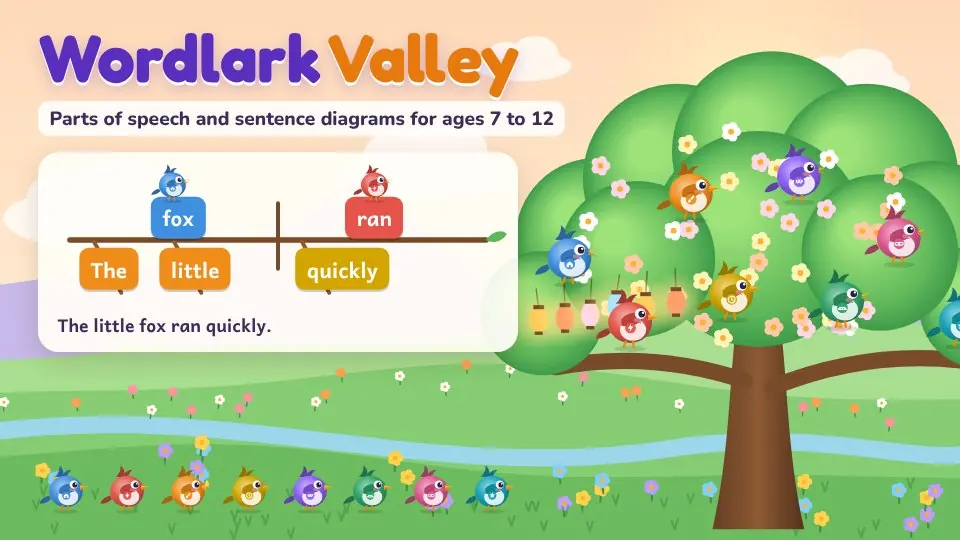
- Sentence diagramming: the subject and verb on the main branch, describing words on slanted twigs, objects after a short upright line, prepositional phrases on a slant and a ledge, forks for compound parts, and dotted lines for joined clauses.
- Hilltop Trails: common and proper nouns, plurals and possessives, subject and object pronouns, who and whom, tense, agreement, active and passive voice, participles, gerunds and infinitives, and comparing with -er and -est.
Every sentence, definition and chant was written for the game, and every answer was checked by hand and by an automatic checker, including tricky words that change jobs, like light, fast, early, down and after.
How to play
Tap Play and pick your child's age. On the very first visit, Juniper shows how to perch a first sentence, Birds sing., on the branch, with a little hand pointing the way, and the larks sing it back. Each stop on the trail has a few short steps. Learn starts with the rule and a chant that lights up line by line, then Juniper solves one example out loud, step by step, and a few easy questions follow with a glowing helper.
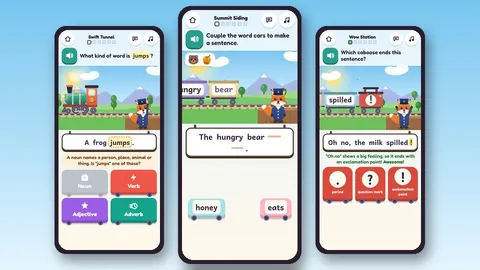
Practice mixes little games with real sentences: tap every noun, say what kind of word the shining word is, find the word an adjective describes, pick the word that fits the gap, catch the birds carrying verbs, fill in the missing words of the rule, and spot one word doing two different jobs.
Diagram rounds start once your child reaches the sentence. The branch shape is already drawn. Tap a word, then tap its spot, or drag it there. When every word is perched, the larks land on the branch and sing the sentence, each word in its family's color and note.
Song check brings in a few questions from earlier stops too, and finishing it adds a feather to the Songbook.
Today's sentence
Every day there is one new sentence, the same for everyone on the same date (it turns over at your own midnight), so brothers, sisters and classmates can compare notes. Your child names a few of its words, hunts for one kind of word, and diagrams it once diagramming has begun. There is no streak to keep and nothing is lost by skipping a day.
Read aloud, softly
Juniper reads the instructions, the rules, the chants and every answer's explanation in a calm, slow voice. For seven and eight year olds read aloud starts on; older children can tap any word, rule or speaker button to hear it. The game picks the warmest voice your device has (enhanced and natural voices first) and you can choose another in the grown-ups corner.
The Sentence Workshop and our storybook
In the Workshop your child builds a silly sentence one word family at a time and watches it happen on a little stage: verbs make the animal move, adjectives change how it looks, adverbs change how fast or gently it moves, prepositions put it on, under or around things, conjunctions bring a friend or join two ideas, and interjections pop out with a burst. Then the larks diagram and sing the sentence, or your child perches it on the branches alone.
Saved sentences become pages of our storybook, which acts each page out again and reads it aloud with every word lighting up in its family's color. New sentence patterns open as the trail goes on.
Visitors, Chant Jam and the field guide
- Visitors: a friendly hedgehog, tortoise, otter or another creature brings a basket of mixed-up words. Sorting them mixes questions from every stop learned so far, which is the kind of spaced, mixed review that keeps skills strong. Each visitor leaves a gift in the valley.
- Chant Jam: the chant plays on a soft beat and the last word of each line goes missing. Tapping the right word fills it in, and tapping right on the beat earns a star.
- The field guide: every word your child sorts flies to its lark's page, so the collection grows with every round. Tap any word to hear it.
Playing together
Turn on Read together (the two people button on the title screen) when you play side by side. After right answers a small talk bubble suggests something to say or do together, like hiding a toy and giving clues with prepositions. The Workshop takes turns, and the storybook can be read in parts: your child reads the nouns and verbs, you read the rest.
What grows over time
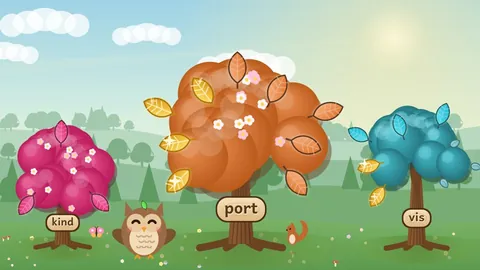
Each lark flies home to the Song Tree when its stop is learned, the tree blossoms as more is learned, a lantern lights for every later stop, and each round plants a flower in the valley. The valley follows your device's clock and calendar, with sunrise, starry nights, falling leaves and snow, and each word family adds something of its own, like a windmill for verbs and a bridge for prepositions. A new tree grows for every two rounds, a lark builds a nest in the Song Tree when its word family gets strong, and every third round the larks learn a new song to play in the Songbook. The Songbook keeps every chant and rule, the field guide and our storybook.
These are fun to watch grow, but nothing is ever needed to keep playing, and there are no timers that run out, no lives, and no sad characters.
How it adapts
Sentences get longer and choices wider as the age setting goes up. Each skill keeps its own strength meter. A missed question comes back a few questions later in the same round, and the Practice button gathers the skills that are due for review, spaced out over days so they stay strong. Hints never just give the answer: the first one asks the question a grammar teacher would ask, like Who or what did it? or Verb what?, and the next one narrows the choices.
For grown-ups
Press and hold For grown-ups on the title screen to see at a glance how many of the eight parts of speech are strong, what to practice next with an idea for home, the grade where each stop is usually taught, each skill's strength, when it is due for review, sentences that were tricky lately, and a list of what every stop covers. You can change the age, pick the reading voice and its speed, turn read aloud on or set it to tap to hear, choose easier letters with extra spacing, larger text, high contrast, less motion, color-blind safe word colors, the valley's season, or open every stop if you teach grammar in a different order.
Tips for grown-ups
- Say the chants together. Classical programs teach definitions by heart for a reason: when a child can recite that an adverb tells how, when, where or how much, every later step gets easier.
- When your child diagrams, ask them to find the verb first, then ask who or what does it. That one habit solves most sentences.
- Point out two-job words in everyday talk: a light jacket, turn on the light, light the candle.
- Short and often beats long and rare. One round a day is plenty.
Privacy and safety
Wordlark Valley is part of our learning games area. There are no ads, no accounts, no chat, no leaderboards and no tracking, and it loads nothing from outside services. Progress stays on the device. Read aloud uses a voice already built into your phone, tablet or computer, chosen for the softest, most natural sound it has, so nothing is downloaded and nothing is sent anywhere. Every word also stays on screen in large, clear letters.
Questions
What age is Wordlark Valley for?
Ages 7 to 12. Seven and eight year olds get shorter sentences, fewer choices and guided diagrams. Older children get longer sentences, compound parts and clauses, and the Hilltop Trails.
Does my child need to know grammar first?
No. The trail starts with nouns and teaches each idea with a rule, a chant and a worked example before any questions.
What is sentence diagramming?
A picture of how a sentence works. The subject and verb sit on a main line, and every other word hangs from the word it belongs to. In the game the lines are drawn for your child, so the puzzle is deciding where each word goes.
Will it match what we use at home?
It follows the classical order of many homeschool grammar books: the eight parts of speech, then the sentence and diagramming, then special properties like case, tense and verbals. A teacher can open every stop to jump to any topic.
Does it read aloud?
Yes. It reads with the softest built-in voice on your device, slower and gentler than usual, and you can choose the voice and speed in the grown-ups corner. Read aloud starts on for ages 7 to 8, and any word can be tapped to hear it at every age.
Is it good for children with dyslexia?
Many children find it easier with the Easy reading letters (a clear learner font with extra space between letters, words and lines), read aloud on, and word families shown by shape as well as color. All of these are in the grown-ups corner.