Games / Puzzle Games / Thimbleberry Stitch / Guide
How to play Thimbleberry Stitch
Color by number, stitched. Pick a thread, drag across the numbered linen and watch a cross-stitch picture appear in your hoop, then see the whole thing stitched again from the first cell to the last.
This is our guide to playing Thimbleberry Stitch. Want to jump straight in? Play Thimbleberry Stitch right here in your browser.
Quick answers
Does Thimbleberry Stitch work on my phone?
Yes. Thimbleberry Stitch works with touch on phones and tablets, and with a mouse or keyboard on a computer. It runs in the browser you already have, so there is no app to download.
Do I need an account to play Thimbleberry Stitch?
No. Just open it and play, with no sign-up. If you like, a free account (username only, no email, for players 13 and older) puts your scores on the leaderboards and backs up your progress so it follows you to any device.
Is there a daily challenge in Thimbleberry Stitch?
Yes. Thimbleberry Stitch has a new daily challenge every day, the same one for every player, with its own daily leaderboard. Find it alongside the others on our daily challenges page.
Is Thimbleberry Stitch OK for kids?
Yes, players of any age can enjoy it. There is no chat and no way to message other players, and nobody needs an account to play. Accounts are for players 13 and older, so younger players just play and their progress stays on their device. For ages 4 to 11 we also have learning games in their own kids area, with no ads, no accounts and no tracking.
What is Thimbleberry Stitch?
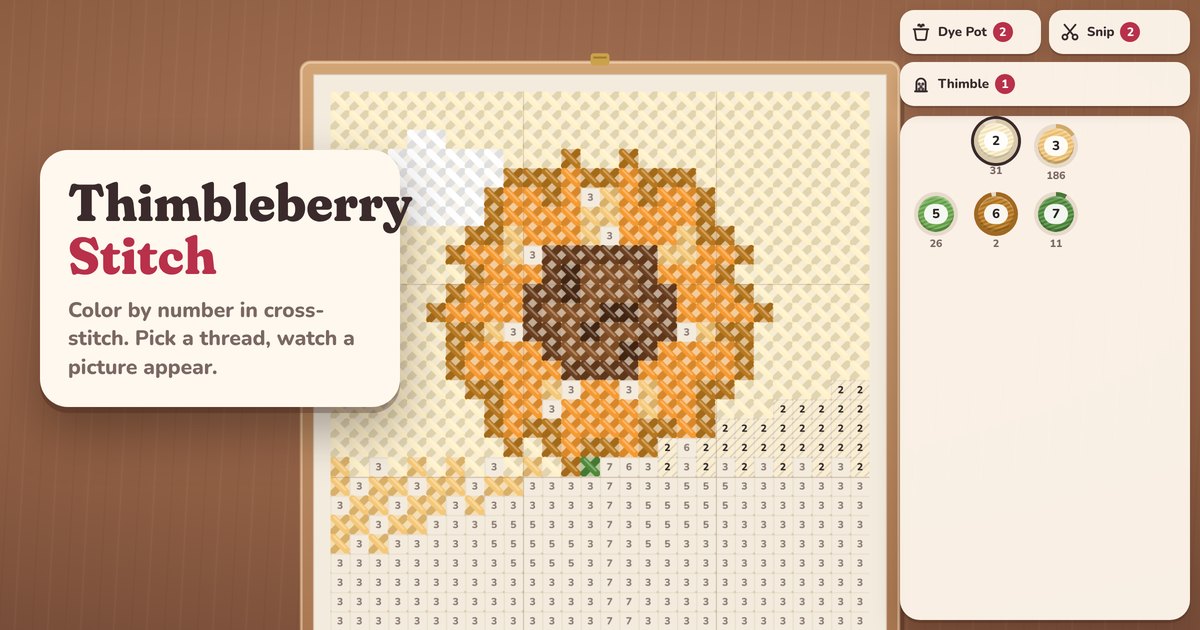
Thimbleberry Stitch is a color by number game dressed as cross-stitch. Every picture starts as a grid of cream linen with a number in each cell. Each number is a thread in the palette at the bottom of the screen. Pick a thread and stitch its cells, and little by little a picture comes through: a sunflower, a lighthouse at dusk, a sleeping cat, a quilt block.
Every picture is drawn in code by us, from 16 by 16 cells up to 40 by 40. There are 240 of them in eight albums (Garden Gate, Seaside, Kitchen Table, Woodland, Night Sky, Desert Bloom, Cozy Home and Quilt Patterns), and every one is open from the start. Nothing is locked and nothing is for sale. It's free and plays in your browser on a phone, tablet or computer, with no download.
How to play
Your selected thread sits raised in the palette, and its cells on the linen are shaded with a soft hatch so you can spot them even when zoomed out. Tap a cell to stitch it. Better still, put your finger on one of those cells and drag: every matching cell you pass over is stitched in one stroke, with a note that climbs as the run grows. Cells with other numbers are simply skipped, so a long sweep never spoils anything.
When a thread is finished it ticks off, leaves the palette, and the next thread is picked for you. The ring around each spool fills as you go and the small number under it tells you how many cells are left.
Numbers fade in as you zoom, so they only show when they are big enough to read. If you tap a cell that needs a different thread, it gives a little wiggle and nothing changes. Press and hold any unstitched cell to switch to its thread.
Controls on phone and computer
- Stitch: tap a cell, or start a drag on a cell of your thread.
- Move around: drag from any other cell, or use two fingers. On a computer, drag with the right or middle button, hold Space and drag, or scroll with a trackpad.
- Zoom: pinch, the mouse wheel, or double tap to zoom in and double tap again to see the whole picture.
- Pick a thread: tap it in the palette, press and hold a cell, or press 1 to 9 and 0 for the tenth. [ and ] step through the threads.
- Keyboard needle: the arrow keys move a needle around the grid, Enter stitches, and Shift with an arrow stitches as you go.
- Find: the magnifier (or F) jumps to the nearest cell you still need, with a pulsing ring around it.
The Pattern Book and Tangles
The Pattern Book is a path of 300 patterns. It starts with small, gentle pictures like a crescent moon and some cherries and grows slowly toward the big 40 by 40 pieces. Finish a pattern and the next one opens. You can go back and stitch any finished pattern again.
Every fifth pattern is a Tangle, our little twist on the idea. Instead of a grid of numbers you get thread spools stacked on wooden pegs. Tap a peg to lift its top spools, then tap another peg to set them down on an empty peg or on the same color. Four of one color on a peg wind tight, and that color is stitched into the picture above in one sweep. Early Tangles use three colors; later ones use up to seven, and some have only one spare peg. Undo is free and unlimited, and Start over puts the spools back where they began. Every Tangle is checked by a solver, so each one can be cleared.
Helpers
Helpers are earned in play and only used when you tap them. You begin with two Dye Pots, two Snips and one Golden Thimble.
| Helper | What it does |
|---|---|
| Dye Pot | Tap a cell and the whole connected patch of that thread is stitched |
| Snip | Tap a cell and every unstitched cell in the 5 by 5 square around it is stitched |
| Golden Thimble | Finishes every cell of your selected thread (it asks first) |
You earn them by finishing every second pattern in the Pattern Book, clearing a Tangle (a Dye Pot), finishing a full album page (a Golden Thimble and a Dye Pot) and completing daily goals. Find is not a helper. It's always free.
Albums and pages
Each album holds six subjects on five pages. Page 1 shows them small and simple, and each later page shows them bigger and with new colors, so the Toadstool on page 5 is a different picture from the one on page 1. In the album, finished pictures appear in full color with a tick, pictures you have started show how far along they are, and the rest show as a faint preview. Finish all six on a page for a reward.
Daily Pattern and leaderboards
The Daily Pattern is the same picture for everyone on the same day (the day changes at midnight UTC). Your first finished run is the one that counts and goes on the daily leaderboard. Any run after that is practice. If the clock passes midnight while you stitch, the run still counts for the day you started it.
| Part of the score | Points |
|---|---|
| Finishing the picture | 6,000 |
| Tidy stitching | 1,500, minus 100 for each wrong tap |
| Longest run in one stroke | 10 per cell, up to 1,500 |
| No helpers used | 1,000 |
The best possible score is 10,000. Finishing the daily also grows your streak, and one missed day a week bends the streak instead of breaking it. A second leaderboard counts how many different pictures you have finished.
Tips
- Zoom out until the numbers fade and use the shading to see the shape of your thread, then zoom in and sweep it in long strokes. Fewer, longer strokes are faster and raise your longest run on the daily.
- For a big background, drag in a slow zigzag across it. Matching cells get stitched and everything else is ignored, so you don't need to be careful at the edges.
- Save the Snip for the last ragged corners of a picture, where many threads meet in a small space.
- On the Daily Pattern, a wrong tap costs 100 points. If you are unsure of a cell, press and hold it to see its thread instead of tapping.
- In a Tangle, try to keep one peg empty as long as you can. An empty peg is where you park a spool while you dig out the one under it.
- High contrast in Settings gives the highlighted cells a strong color and adds a small shape to every spool, and Big numbers makes the numbers larger and shows them sooner.
Questions
Is Thimbleberry Stitch free?
Yes. It's free to play in your browser, with no ads in the game and nothing to buy. Every picture is open and every helper is earned.
How do I find the last cells of a color?
Tap the magnifier. It moves the view to the nearest cell you still need and rings it. It's free and you can use it as often as you like.
Can I color in more than one cell at a time?
Yes. Start a drag on a cell of your thread and every matching cell under your finger is stitched in one stroke.
Is my progress saved?
Yes. Every stroke is saved on your device, and half-finished pictures wait for you in the albums and the Pattern Book.
Does it work on a computer?
Yes. Use the mouse to stitch and zoom, or the keyboard: arrows, Enter, number keys and F to find a cell.