Games / Puzzle Games / Doubloom / Guide
Doubloom
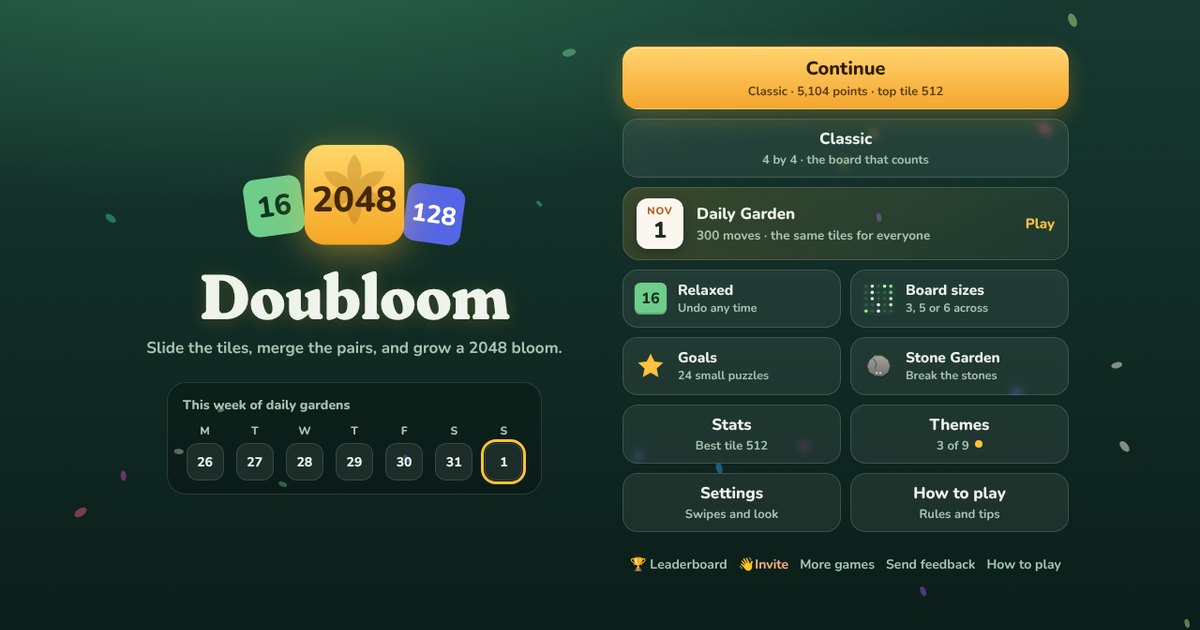
Doubloom is the sliding number puzzle where two matching tiles merge into one worth double. Grow your tiles from 2 all the way to 2048, then keep going, with a fresh Daily Garden every day.
Quick answers
Does Doubloom work on my phone?
Yes. Doubloom works with touch on phones and tablets, and with a mouse or keyboard on a computer. It runs in the browser you already have, so there is no app to download.
Do I need an account to play Doubloom?
No. Just open it and play, with no sign-up. If you like, a free account (username only, no email, for players 13 and older) puts your scores on the leaderboards and backs up your progress so it follows you to any device.
Is there a daily challenge in Doubloom?
Yes. Doubloom has a new daily challenge every day, the same one for every player, with its own daily leaderboard. Find it alongside the others on our daily challenges page.
Does Doubloom save my progress?
Yes. It saves on this device on its own, so you can close the page and pick up where you left off. Sign in with a free account to keep the same progress on your phone and your computer.
Is Doubloom OK for kids?
Yes, players of any age can enjoy it. There is no chat and no way to message other players, and nobody needs an account to play. Accounts are for players 13 and older, so younger players just play and their progress stays on their device. For ages 4 to 11 we also have learning games in their own kids area, with no ads, no accounts and no tracking.
What is Doubloom?
Doubloom is our take on the classic 2048 puzzle. You slide every tile on the board at once, and when two tiles with the same number bump into each other they merge into one tile worth both. A 2 and a 2 make a 4, two 4s make an 8, and so on up the line. The goal everyone chases is the 2048 tile, but the board doesn't stop there.
Every tile in Doubloom has its own color and a little garden picture, from a seed on the 2 to a sunflower on the 1024 and a golden bloom on the 2048. The number is always printed big on the tile, so you never have to rely on color. It's free, it plays in your browser on a phone, tablet or computer, and there's nothing to download.
How to play 2048
Swipe (or press an arrow key) and every tile slides as far as it can in that direction. Tiles stop when they hit the wall or another tile. If two tiles with the same number meet, they merge into one.
After every move that changes the board, one new tile appears in a random empty square. Nine times out of ten it's a 2, and one time in ten it's a 4. A move that changes nothing doesn't count and doesn't add a tile.
Each tile can only merge once per move. So a row of 2, 2, 2, 2 slid left becomes 4, 4, not 8. When three of the same number sit in a row, the two closest to the wall you're sliding toward merge first.
The game ends when the board is full and no two neighbors match, so no move can change anything.
Controls on a phone or computer
On a phone or tablet, swipe anywhere on the play screen. We wait for your finger to move a short distance before the tiles go, and once a swipe picks a direction it sticks with it, so a small wobble or a curved thumb won't send the tiles the wrong way. If swipes feel too eager or too slow, the Swipe feel setting has Light, Normal and Firm.
On a computer, use the arrow keys or W A S D. U undoes (where undo is allowed), N starts a new game and Esc opens the menu.
You can swipe or press as fast as you like. Every move is queued and played in order, so nothing gets dropped while the tiles are still sliding.
Scoring
Each merge adds the value of the new tile to your score. Merging two 64s adds 128. Merging two 1024s adds 2048. Your score after a game is roughly the sum of all the tiles you built along the way, so bigger tiles count for a lot more than lots of small ones.
| You make | Points added |
|---|---|
| 4 | 4 |
| 64 | 64 |
| 512 | 512 |
| 2048 | 2048 |
Modes
- Classic: the 4 by 4 board. Clean runs go on the all-time Classic leaderboard.
- Daily Garden: 300 moves on the 4 by 4 board. Everyone starts with the same tiles, and the same moves bring the same new tiles, so it's a fair race. Your first garden of the day counts.
- Relaxed: undo as often as you like, even after the board fills up.
- Board sizes: 3 by 3 (tight and tricky), 5 by 5 and 6 by 6 (room for very long games).
- Goals: 24 small puzzles such as "grow a 256 in 200 moves". Fewer moves earn more stars, and the last few levels are marked expert.
- Stone Garden: a 5 by 5 board with stones that never move. A merge right beside a stone cracks it, three cracks break it, and a new stone drops every 22 moves.
Undo and rewinds
Undo is a big argument among 2048 players, so we made it clear. In Relaxed mode you can undo any time. Undo puts back the exact same tiles, so it fixes a slip but can't be used to fish for a better new tile.
Everywhere else, you earn rewinds by playing. Each time you grow a 256 or bigger in a run you earn one, and you can bank up to 3. A rewind takes back one move. A Classic run that uses one is marked and stays off the Classic board, which keeps that board honest. The Daily Garden has no undo at all. Rewinds are never sold.
Daily Garden and leaderboards
The Daily Garden changes at midnight UTC. You get 300 moves, and your score when they run out (or when the board fills) goes on the daily board. It posts once a day, even if you replay it, reload the page or play in a second tab. Replays are just for fun.
Sign in on the site to put your name on the daily board and the all-time Classic board, and to keep your progress and streak on every device. Your share card shows your top tile, moves and score, never the board itself.
Themes and tiles
You start with Greenhouse and Linen Morning. Others are earned: Night Pond for your first 512, Terracotta at 1024, Golden Hour at 2048, Moon Garden at 4096, First Light after five daily gardens, Orchard at 30 goal stars and Slate Path after breaking 25 stones. Settings also has high contrast tiles with bold colorblind friendly colors, and a calm motion option.
2048 strategy and tips
Pick a corner
Choose one corner and keep your biggest tile there all game. Most strong players use a bottom corner. Then avoid the one direction that would pull that tile out, for example never swipe up if your big tile lives at the bottom.
Build a chain
Line up your tiles along the edge in falling order, like 512, 256, 128, 64. When the smallest one doubles, it rolls into the next, which rolls into the next. One good swipe can merge four times.
Keep the edge row full
If the bottom row is full, swiping left and right won't move your big tiles out of place. A gap in that row is where trouble starts, so fill it fast with a small tile.
Don't rush merges
A merge you can make now is often still there next move. Sometimes it's better to set up a second pair first so one swipe makes both.
Small boards and stones
On 3 by 3 every square matters, so merge small tiles early. In Stone Garden, build your chain on the side away from the stones and crack a stone when it starts blocking your corner.
Questions
Is Doubloom free?
Yes. It's free to play in your browser with no ads, no pop ups and nothing to buy.
What happens after you make 2048?
We celebrate, and then you can keep playing. The board goes on to 4096, 8192 and beyond for as long as you can keep a move open.
Does Doubloom have undo?
Relaxed mode has unlimited undo. In other modes you earn up to 3 rewinds by growing big tiles. The Daily Garden has none, and Classic runs that rewind stay off the Classic board.
How often does a 4 appear instead of a 2?
One time in ten, the same as the classic rules. New tiles only appear after a move that changes the board.
Can I play 2048 on a bigger board?
Yes. Doubloom has 3 by 3, 4 by 4, 5 by 5 and 6 by 6 boards. Bigger boards make much longer games and bigger tiles.
Is the Daily Garden the same for everyone?
Yes. Everyone starts with the same tiles that day, and the same moves bring the same new tiles. It resets at midnight UTC.