
Games / Hole games
Free hole games
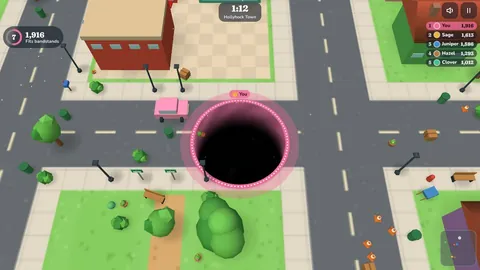
Our hole game is Hollyhock Hole. You're a hole in the ground of a little 3D town. Slide under cones, benches and fruit carts and they tip over the edge and drop in. Every gulp makes you wider, until cars, buses and finally the town hall fit too. It's free, it plays in the browser on a phone, tablet or computer, and there's nothing to download.
Hole game
Steer a growing hole and swallow a whole little town · 1 game
More like it
Games our players pair with it · 2 games

What is Hollyhock Hole?
Hollyhock Hole is a hole swallowing game in real 3D. You steer an opening in the ground around one of six places: Hollyhock Town, Meadow Park, Market Square, Harbor Wharf, Snowcap Village and Orchard Farm. Anything with a footprint smaller than your hole tips over the lip and falls in. Each thing adds points and helps you grow, so the game starts with cones and flower pots and ends with apartment towers and ferries.
How to play
Put a finger down anywhere on the screen and drag. A small stick appears under your finger and the hole follows the way you push. On a computer you can drag with the mouse or use the arrow keys or W A S D. P or Esc pauses, and M turns the sound off.
Slide under something that fits and it leans toward the middle, slides in and drops out of sight. When it reaches the bottom you get its points. Things that are too big just rock on the rim, so you'll want to come back once you've grown.
Ways to play
- Play a round: two or three minutes against three to seven house holes on the map you pick. The hole with the most points when the clock runs out is the biggest in town.
- Levels: clear the map before the clock runs out. Three quarters earns a star, nine tenths two stars and everything three. There are 30 handmade levels, from First steps to Grand tour, and new generated levels keep coming after them.
- Zen: no clock and no rivals, and small things slowly grow back. Finish whenever you like.
- Play friends: one room code for 2 to 8 players on their own devices. Empty places can be house holes, and if someone leaves a house hole carries on for them. Reactions are preset, so there's no typed chat.
Tips and strategy
- Spend the first twenty seconds on the smallest things. Rows of cones, pots and fruit baskets grow you fastest early on.
- Read the line under your points. When it changes to a new kind of thing, go find those, because they're worth far more than what you were eating.
- Keep combos alive by sweeping along sidewalks and market rows instead of zigzagging between single objects.
- Watch the map in the corner. Big dots are holes that can swallow you, so give them room until you've caught up.
- Hunting is risky. A hole only needs to be 15 percent wider than you, so check the sizes on the board before you chase someone.
- In Levels, leave the biggest piece for last. The time limit is set so a careful sweep has room to spare.
More games like Hollyhock Hole
- Noodle Rush: You're a noodle in a giant bowl of ramen.
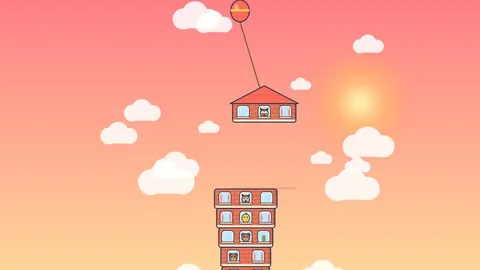
- Sky Stack: A floor swings from the crane above your tower.
Questions
Is there a free hole game online?
Yes. Hollyhock Hole is free in the browser on a phone, tablet or computer, with no download and no sign up.
How do you get bigger in Hollyhock Hole?
Swallow things that fit. Each one adds to your size ring, and there are twelve sizes. Combos add bonus points, and swallowing a smaller hole gives you a big jump.
Can you play a hole game with friends online?
Yes. One player hosts and gets a four letter room code, and 2 to 8 players join on their own phones, tablets or computers. Empty places can be filled with house holes.
What happens when another hole swallows you?
You come back three seconds later somewhere quiet, two sizes smaller, with a short shield. Your points so far stay with you.
Are the house holes real people?
No. They're our house players with names and personalities, and we always show them as house holes. Online rooms are the only place you play people.
Does it work on phones?
Yes. It's built for phones first, in portrait or landscape, and it lowers the picture quality on its own if a device starts to struggle. You can also pick low, medium or high in Settings.