Games / Puzzle Games / Pennywort Peek / Guide
Pennywort Peek
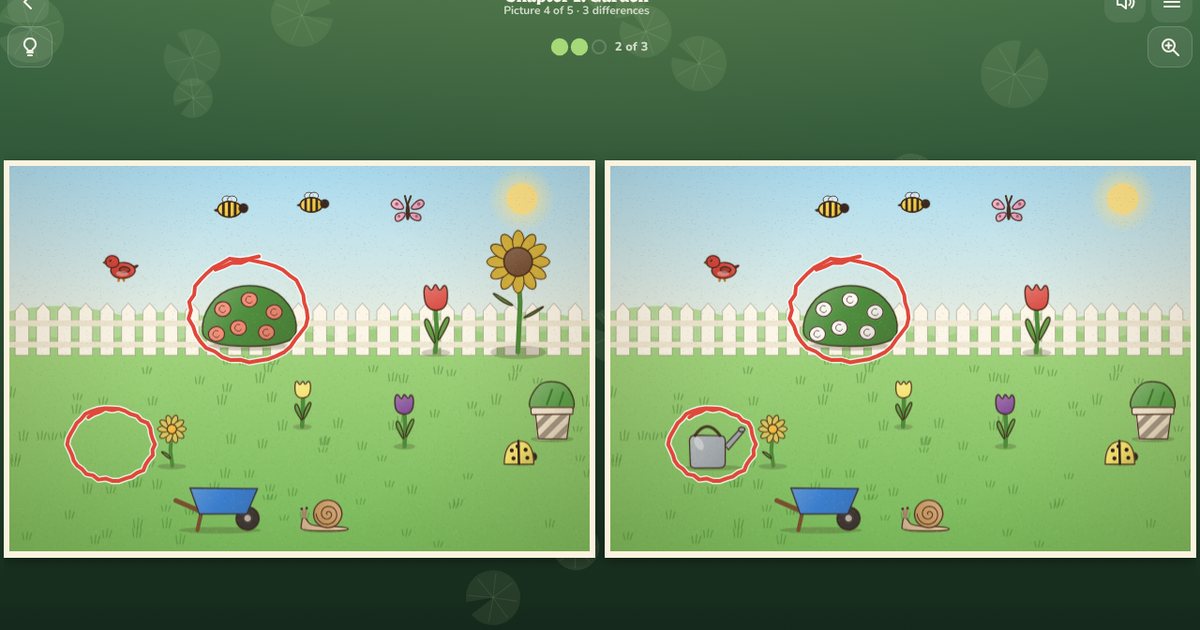
Pennywort Peek is a spot the difference game with two storybook pictures side by side and a few small changes between them. Find every change at your own pace. We paint every picture in code, so there's always a new one waiting, from a sunny garden to a starry night.
Quick answers
Does Pennywort Peek work on my phone?
Yes. Pennywort Peek works with touch on phones and tablets, and with a mouse or keyboard on a computer. It runs in the browser you already have, so there is no app to download.
Do I need an account to play Pennywort Peek?
No. Just open it and play, with no sign-up. If you like, a free account (username only, no email, for players 13 and older) puts your scores on the leaderboards and backs up your progress so it follows you to any device.
Is there a daily challenge in Pennywort Peek?
Yes. Pennywort Peek has a new daily challenge every day, the same one for every player, with its own daily leaderboard. Find it alongside the others on our daily challenges page.
What is spot the difference?
Spot the difference is one of the oldest picture puzzles around. You get two pictures that look the same at first glance, and someone has quietly changed a few things in one of them. A flower turns yellow, a cat goes missing, a cup grows a stripe. Your job is to find every change.
It's a calm sort of game, good for a quiet five minutes, and it's fun to share with a younger player sitting next to you. We built Pennywort Peek so you can play it the relaxed way, with no clock and no penalty for a wrong tap, or switch on a clock when you want a challenge. It's free, it runs in your browser, and there's nothing to download.
How to play Pennywort Peek
- Look at the two pictures. On a phone held upright they sit one above the other, and on a wider screen they sit side by side.
- When you see something that is different, tap it (or click it) in either picture. We draw a ring round it in both.
- The dots at the top count how many changes are left. A picture has anything from 3 to 10.
- Find them all to finish the picture. On the storybook path that earns up to three stars.
If you get stuck, the light bulb draws a soft circle round roughly where to look. It doesn't point at the change itself, so there's still a little hunting to do. Tap the magnifier, or pinch with two fingers, to look closer, and drag to move round while you're zoomed in.
The eight kinds of change
Every picture mixes a few of these. Knowing them helps, because once you know what can change you know what to compare.
- Missing: something in one picture isn't in the other.
- Extra: something new has turned up.
- Colour: the same thing in a new colour. We always make it lighter or darker as well, so you can see it even if two colours look alike to you.
- Size: a thing has grown or shrunk.
- Flipped: a thing faces the other way, like a duck looking left instead of right.
- Moved: a thing has slid a little to one side.
- Swapped: a different thing of the same sort, like a pear where an apple was.
- Pattern: new stripes, spots or checks on a cup, a towel or a tent.
Every change is big enough to see on a phone, never hides under a button and never sits on top of another change. We test that by drawing thousands of pictures and measuring each change, in normal colours and in high contrast.
Controls on phones and computers
On a phone or tablet, tap a change to mark it, pinch to zoom and drag to look round. On a computer, click a change, use the mouse wheel to zoom and drag to move round.
You can play with the keyboard too. Tab to the pictures, then the arrow keys move a little finder (hold Shift for big steps) and Enter checks the spot under it. H shows a hint, Z zooms in or out, 0 shows the whole picture again and Esc opens the menu.
The storybook path and endless pictures
The storybook path has 12 chapters of 5 pictures each: Garden, Kitchen, Beach, Pond, Market, Bedroom, Forest picnic, Aquarium, Town street, Farm, Snowy village and Night sky. We picked each picture by hand. The first chapter starts with 3 big, friendly changes, and by the last chapter a busy picture hides 10 smaller ones. Finish a chapter to open the next.
Each picture on the path earns up to three stars. Every hint costs one star, but you always keep at least one, and you can replay any picture to raise your stars. There are 180 stars to collect.
Endless gives you a new picture every time, picked from all twelve places. It starts gently with 3 changes and adds one more every five pictures, while the scenes slowly get busier and the changes a little smaller. The leaderboard keeps the furthest picture you've reached.
The Daily Peek and leaderboards
The Daily Peek is three pictures with 5, 7 and 9 changes, the same for everyone on the same day (the day changes at midnight UTC). The clock always runs in the daily, and each picture scores up to 1000 points:
| Each picture | Points |
|---|---|
| Starts at | 1000 |
| Every second | minus 3 |
| Every miss | minus 40 |
| Every hint | minus 150 |
| Lowest score | 100 |
Your first go of the day goes on the daily board, out of 3000. You can play the same pictures again just for fun, but only the first score counts. The share card shows your score with a little flower for each picture and your times, and never says where the changes were, so it won't spoil it for anyone.
Relaxed or timed
Relaxed is the default. There's no clock, and a wrong tap costs nothing, which makes it a good way to play with children. If you like a little pressure, turn on Timed in Settings. Each picture then gets 30 seconds plus 15 for every change, and a miss takes 5 seconds off. If the clock runs out you can keep looking with no clock (that picture earns one star) or start it again.
Frames, inks and awards
Playing earns 18 awards, and most of them unlock a new frame for the pictures or a new ink for the rings you draw. Finish your first picture for the oak frame, find a picture's changes with no misses and no hints for the hearts ink, and finish all twelve chapters for the velvet frame. Stats show how many of each kind of change you've found.
Tips for finding differences faster
- Work in strips. Scan one picture from left to right across the top, glance at the same strip in the other picture, then move down. Wandering eyes miss things.
- Count things. Three apples on one side and two on the other is a change you can find without looking closely at anything.
- Check the edges and the sky. Changes like to hide where you look least: a corner, a cloud, a shelf at the top.
- Compare one thing at a time for colours and patterns. Pick a cup, look at it in both pictures, then move on.
- Look at which way things face. Birds, cars, teapots and cats can all turn round.
- Zoom in on busy spots. A market stall or a full shelf is much easier at twice the size.
Made for everyone
High contrast mode draws every picture with bold black outlines and flat colours on a quieter background, with yellow rings. Less motion turns off sparkles, pulses and falling leaves. Colour changes always change lightness too, so you can play without telling colours apart. There are no accounts needed, no chat and nothing to type, so it's a safe pick for kids. If you'd like more calm puzzles after this, try Mosaic Logic or Memory Match.
Questions
Is Pennywort Peek free?
Yes. It's free to play in your browser on a phone, tablet or computer, with no ads and nothing to download.
How many differences are in each picture?
Between 3 and 10. The first pictures on the storybook path have 3 big changes, and the count grows slowly up to 10 in the last chapter and in later Endless pictures.
Is there a time limit?
Not unless you want one. Relaxed play has no clock. Turn on Timed in Settings for a clock on every picture. The Daily Peek always counts your time, because time is part of its score.
What does a hint do?
It draws a circle round roughly where a change is. On the storybook path each hint costs a star, and in the Daily Peek it costs 150 points.
Is it good for kids?
Yes. Relaxed play has no clock and no penalty for a wrong tap, the first chapter uses big, friendly changes, and there's no chat or anything to type.
Does my progress save?
Yes. Your stars, a picture in progress, the Daily Peek and your frames save on your device, and sync to your other devices if you sign in to Airscape Works.