Games / Puzzle Games / Glintfall / Guide
Glintfall
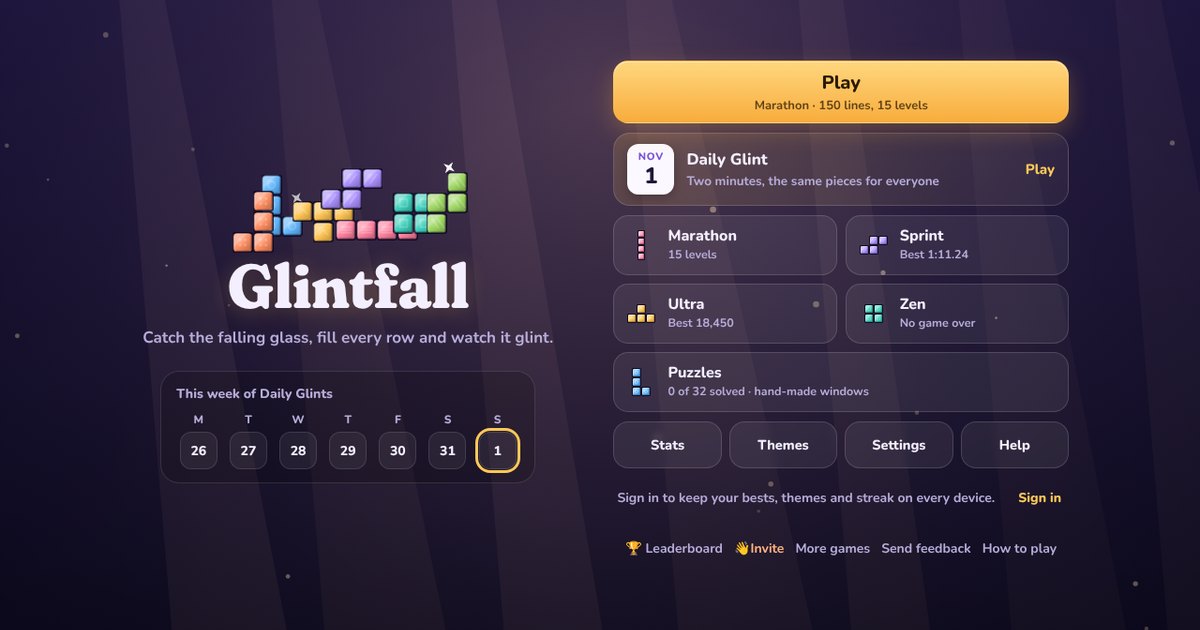
Glintfall is our take on the classic falling blocks puzzle. Pieces of colored glass drop into a window ten panes wide, and every row you fill flashes with light and clears away.
Quick answers
Do I need an account to play Glintfall?
No. Just open it and play, with no sign-up. If you like, a free account (username only, no email, for players 13 and older) puts your scores on the leaderboards and backs up your progress so it follows you to any device.
Is there a daily challenge in Glintfall?
Yes. Glintfall has a new daily challenge every day, the same one for every player, with its own daily leaderboard. Find it alongside the others on our daily challenges page.
Does Glintfall save my progress?
Yes. It saves on this device on its own, so you can close the page and pick up where you left off. Sign in with a free account to keep the same progress on your phone and your computer.
Is Glintfall OK for kids?
Yes, players of any age can enjoy it. There is no chat and no way to message other players, and nobody needs an account to play. Accounts are for players 13 and older, so younger players just play and their progress stays on their device. For ages 4 to 11 we also have learning games in their own kids area, with no ads, no accounts and no tracking.
What is Glintfall?
You know the idea: shapes made of four squares fall from the top, you slide and turn them, and a full row disappears. We built Glintfall because we wanted a version that feels as good on a phone as it does on a keyboard, with modern rules, tunable controls and none of the pop-ups that get in the way. It's free, it runs in your browser on a phone, tablet or computer, and there's nothing to download.
Our pieces are panes of stained glass. Each of the seven shapes has its own name, its own color and its own etched mark, so you can tell them apart even if colors are hard for you to see. Clear four rows with one piece and the window flashes: that's a Glint, the biggest plain clear in the game.
The pieces
| Piece | Shape | Mark |
|---|---|---|
| Beam | Four in a line | Three stripes |
| Pane | Two by two square | A small square |
| Crest | Three in a row with one on top | A peak |
| Zig | A step up to the right | Slashes |
| Zag | A step up to the left | Back slashes |
| Crook | Three in a row with one up on the left | Four dots |
| Hook | Three in a row with one up on the right | A ring |
Pieces come in shuffled sets of seven, one of each shape. So the longest you can ever wait for a Beam is twelve pieces, and you never get a long run of the same shape. The next five pieces always show in the preview.
Controls on a phone or tablet
- Drag left or right anywhere on the screen. The piece follows your finger one column at a time.
- Tap to turn. The right half of the screen turns clockwise and the left half turns back.
- Drag down slowly to pull the piece down row by row. Flick down to drop it all the way.
- Flick up, or tap the hold box, to tuck the piece away for later.
We spent a lot of time on the touch controls, because that's where phone versions of this game usually go wrong. A drag that starts sideways stays sideways, so a slightly crooked swipe never drops your piece by accident. A swipe that starts at the very top edge of the screen (where you pull down notifications) is ignored. And with Drop safety on, a finger that was already on the glass when a new piece arrives can't flick that new piece down.
In Settings, Touch you can change how far a drag moves the piece, how fast a flick has to be to drop, and whether a tap always turns clockwise. If you'd rather press buttons, pick Buttons or Both. The buttons sit in two thumb clusters at the bottom (move and drop on one side, turn and hold on the other), come in three sizes and can swap sides for left-handed play.
Controls on a computer
- Left and Right move, Down soft drops and Space hard drops.
- Up or X turns clockwise, Z or Ctrl turns back and A does a half turn.
- C or Shift holds, R restarts a Sprint, Ultra or puzzle instantly and Esc pauses.
Every key can be changed in Settings, Keyboard. That's also where you'll find the handling numbers keen players care about: DAS (how long you hold a direction before the piece starts sliding, 150 ms by default), ARR (the gap between steps while it slides, 33 ms by default, and 0 means it jumps straight to the wall), soft drop speed from 5x up to instant, and a short DAS cut so a held direction doesn't shove the next piece away before you see it.
Rules that make it fair
When a turn bumps into a wall or the stack, the piece tries a few nearby spots before giving up. That's what lets you twist pieces into tight gaps. Once a piece touches down you get half a second before it sets, and moving or turning resets that clock up to 15 times, so you can't stall forever. A faint ghost shows exactly where the piece will land, and you can make it bolder or turn it off in Settings, Look.
Hold works once per piece. Use it to save a Beam for a well you're building, or to dodge a shape that doesn't fit right now.
Scoring
| Clear | Points (times your level) |
|---|---|
| Single | 100 |
| Double | 300 |
| Triple | 500 |
| Glint (four rows) | 800 |
| Crest twist single | 800 |
| Crest twist double | 1,200 |
| Crest twist triple | 1,600 |
| Small twist single | 200 |
| Back to back Glints or twists | 1.5 times |
| Chain | 50 times the chain length |
| Spotless (window left empty) | 800 to 3,200 extra |
A Crest twist happens when the Crest's last move is a turn and three of the four corners around its middle are filled. If only one of the two corners it points at is filled, it counts as a small twist. Twists and Glints in a row are back to back and pay half again. A chain builds when piece after piece clears at least one row. Soft drops give 1 point a row and hard drops give 2.
Modes
- Marathon: clear 150 lines while the speed climbs through 15 levels, one level every 10 lines. Runs that start at level 1 go on the Marathon board. Leave halfway and we keep your game exactly as it was.
- Sprint: clear 40 lines as fast as you can. The Sprint board ranks by time.
- Ultra: score as much as you can in two minutes.
- Zen: no clock and no game over. Pieces wait until you drop them, or pick a gentle drift. If the glass reaches the top, we sweep it away and you carry on.
- Puzzles: 32 hand-made windows in four sets (First Light, Glints, Crest Twists, Chains and Sweeps). Each has a goal and a short list of pieces, and nothing falls until you drop it. Our solver has checked every one, so there's always a way.
The Daily Glint and leaderboards
Every day at midnight UTC a new Daily Glint opens: two minutes on a window that starts with six rows of old glass, with the same pieces in the same order for everyone. Your first finished run of the day goes on the daily board and keeps your streak going. You can replay it just for fun, and a run you started before midnight still counts for the day you started it.
There are boards for the Daily Glint, Sprint, Ultra and Marathon. Sign in on the site to put your name on them and keep your bests, themes and streak on every device.
Themes and stats
You start with Dusk Window and earn seven more looks by playing: Sea Glass (clear 100 lines), Ember Kiln (reach level 8 in Marathon), Moonlit (finish a Sprint), Meadow Morning (solve 8 puzzles), Aurora (play 5 Daily Glints), Neon Night (score 25,000 in Ultra) and Gilded Hall (finish a Marathon). Every theme keeps the same color and mark for each piece. There's also a high contrast mode, stronger piece marks and a reduced motion setting.
Stats track pieces per second, your best Sprint and Ultra, Glints, twists, your longest chain and your finesse: the share of pieces you placed with the fewest presses.
Tips
- Keep your stack flat and leave one column open on a side. When a Beam comes, drop it in for a Glint.
- Look at the preview before every move. Knowing the next two pieces is worth more than speed.
- Use hold early. Saving a Beam while you build a well is the classic move.
- For Sprint, learn to place each piece with as few presses as you can. Holding a direction to the wall counts as one press, so walls are your friends.
- To set up a Crest twist double, leave a slot three wide with a one-wide notch under its middle and a ledge over one side. Drop the Crest pointing sideways next to the slot, then turn it in. The Crest Twists puzzles walk you through it.
- In Ultra, lean on Glints and back-to-back clears rather than singles. The level climbs as you clear, and every clear is multiplied by it.
- Spotless clears pay a lot. In a Sprint opener, watch for chances to empty the window completely.
Questions
Is Glintfall free?
Yes. It's free to play in your browser on a phone, tablet or computer, with no ads and nothing to download.
Can I change DAS and ARR?
Yes. Settings, Keyboard has sliders for DAS, ARR and DAS cut delay, plus soft drop speed from 5x to instant. Touch buttons have their own DAS and ARR.
Does it have hold and a next preview?
Yes. You can hold one piece (once per piece) and you see the next five pieces.
What is a Glint?
Clearing four rows with one piece. It scores 800 times your level, and half again if your last big clear was also a Glint or a twist.
Is the daily the same for everyone?
Yes. Everyone gets the same starting window and the same pieces in the same order for the UTC day, and only your first finished run goes on the board.
Can I play with one hand on a phone?
Yes. With gestures you can play the whole game with one thumb: drag, tap, flick down and flick up.