
Games / Puzzle Games / Keyhole Cottage / Guide
How to play Keyhole Cottage
Keyhole Cottage is our take on escape room games, online and free: short, sunny rooms you solve by tapping around, picking things up, putting them together and cracking little lock puzzles whose answers are hiding in plain sight.
This is our guide to playing Keyhole Cottage. Want to jump straight in? Play Keyhole Cottage right here in your browser.
Quick answers
Does Keyhole Cottage work on my phone?
Yes. Keyhole Cottage works with touch on phones and tablets, and with a mouse or keyboard on a computer. It runs in the browser you already have, so there is no app to download.
Do I need an account to play Keyhole Cottage?
No. Just open it and play, with no sign-up. If you like, a free account (username only, no email, for players 13 and older) puts your scores on the leaderboards and backs up your progress so it follows you to any device.
Is there a daily challenge in Keyhole Cottage?
Yes. Keyhole Cottage has a new daily challenge every day, the same one for every player, with its own daily leaderboard. Find it alongside the others on our daily challenges page.
Does Keyhole Cottage save my progress?
Yes. It saves on this device on its own, so you can close the page and pick up where you left off. Sign in with a free account to keep the same progress on your phone and your computer.
Escape room games, the cozy way
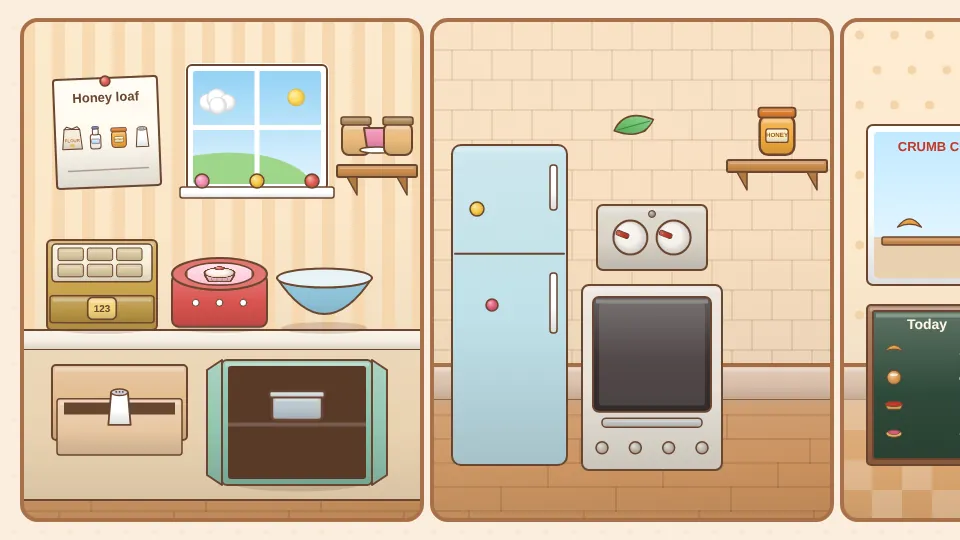
Most escape room games online lock you in a dark cellar and start a clock. We wanted the opposite. In Keyhole Cottage we're looking after a little village for a month, and every room is a friendly errand: bake the first honey loaf in the bakery, water the seedlings in the greenhouse, polish the big lamp at the lighthouse. Nobody is ever trapped. The last step of each room is opening a door or a gate so the day can start.
It plays free in your browser on a phone, tablet or computer, with nothing to download. There's no timer and no way to lose, so you can put it down halfway through a room and pick it up tomorrow exactly where you left off.
How to play
Each room has two or three walls. Turn between them with the arrows under the picture, or swipe across it. Tap anything that looks interesting: a drawer, a jar on a shelf, a note pinned to the wall, a door. Some things open, some go into your bag, and some just tell you a little more about the room.
- Picking up: tap an item in the room and it drops into the bag at the bottom of the screen.
- Using an item: tap it in the bag, then tap where it should go. A watering can goes on a thirsty planter, a tiny key goes in a tiny keyhole.
- Putting things together: tap one item in the bag, then another. Dough goes into a bread tin, a lens pops into an empty frame.
- Looking closer: tap a chosen item a second time to read about it.
- Undo: the curved arrow takes back your last step, so experimenting is safe.
Spots are big on purpose, so you never have to hunt for a single pixel. The sparkle button at the top makes everything you can tap twinkle, and if you tap empty wall twice the sparkles appear for a moment by themselves.
The puzzles
Every lock has its answer somewhere in the same room. Read the notes, look at the pictures and count what's on the shelves. The puzzles open in a close up panel and come in a few kinds:
- Dial locks with numbers, colors, little pictures, compass points or clock hands.
- Order puzzles, like adding ingredients in recipe order or raising signal flags in the right sequence.
- Sliding pictures on a tin lid or a box: slide the tiles until the picture matches the small one.
- Dot pattern locks: draw a path through nine dots, copied from something you've seen in the room.
A wrong try just shakes the dials. Nothing resets and nothing is lost, so have another look around and try again.
Hints that nudge, not spoil
Stuck? The lightbulb button gives hints for your very next step only, in three levels. First a gentle nudge ("the tulip buds look thirsty"), then a clearer pointer that also makes the right spot glow, and last the plain answer. Hints are free and unlimited.
Each room has three stars: one for finishing, one for finishing without opening the answer level, and one for finding the ladybug hidden somewhere on the walls. Replaying a room keeps your best stars.
The rooms and the weekly schedule
Everyone starts on the front porch of the cottage, a short first room where a friendly coach points the way, one step at a time. Then the village opens up. At launch you can play Crumb Corner Bakery, the Sunny Greenhouse and Lighthouse Cottage, and after that a new room opens every Monday: Willow Lane Library, the Bramble Tea Room and Meadow Halt Station. The village map shows what's done, what's in progress and when the next room arrives.
| Room | What we're doing |
|---|---|
| The Front Porch | Opening the garden gate for the morning sun |
| Crumb Corner Bakery | Baking a honey loaf and opening the shop |
| Sunny Greenhouse | Watering the seedlings and letting the bees in |
| Lighthouse Cottage | Polishing the lamp and raising the flags |
| Willow Lane Library | Shelving books and opening the reading nook |
| Bramble Tea Room | Brewing the house blend for the terrace |
| Meadow Halt Station | Setting the clock before the little train arrives |
The Daily Lock
The Daily Lock is a quick one screen puzzle, the same for everyone on the same day. A box has four dials with six symbols (sun, leaf, cup, star, key and heart), and no symbol is used twice. You're shown a few earlier tries, each with how many symbols were in the right place and how many were right but in the wrong place. Those rows always point to exactly one answer, so it can be solved by logic alone.
Open it on the first try for 100 points. Each extra try costs 15, and each hint (which shows one dial) costs 20. Your first finish of the day goes on the daily leaderboard, and a fresh lock arrives at midnight where you live.
Tips
- Visit every wall before you start using items. Half the fun is noticing a clue on one wall that opens something on another.
- Notes often say how to read a clue, not just what it is: left to right, smallest to biggest, top to bottom.
- If an item doesn't fit anywhere yet, try putting it together with something else in the bag.
- On the Daily Lock, start with a row that has zero symbols in the right place. It tells you where each of those symbols can't go.
- On a computer, Tab moves between the things you can tap, the arrow keys turn, H opens hints, U is undo and Escape closes any panel.
Questions
Is Keyhole Cottage free?
Yes. Every room and the Daily Lock are free to play in your browser, with no download and no account needed.
Is it scary?
Not at all. The rooms are sunny and cozy, there's no timer, and nobody is ever locked in. Each room ends with opening a door or a gate.
How long does a room take?
The first porch room takes a couple of minutes. The others take about 10 to 15 minutes, and your progress is saved after every step.
When do new rooms come out?
A new room opens every Monday. The village map shows the date of the next one.
What if I get stuck?
Tap the lightbulb for a hint about your next step: a nudge, then a pointer, then the answer. You can also tap the sparkle button to see every spot you can tap.
Can kids play?
Yes. The rooms are gentle and the hints are free, so younger players can always find their way with a grown up nearby or on their own.
Related guides
 How to play Pennywort PeekSpot the difference
 How to play Teasel TidyTidying game
 How to play Mosaic LogicPicture logic
 How to play Moon JarDrop and merge
 How to play Jelly JarsSort puzzle
More to read
You might also like
2 minSavesPennywort Peek
Spot the differenceTwo storybook pictures, a few small changes. Find them all at your own pace across twelve painted places, from a garden to a starry night: a storybook path with stars, endless new pictures and a Daily Peek.