
Games / Puzzle Games / Honeyloop / Guide
How to play Honeyloop
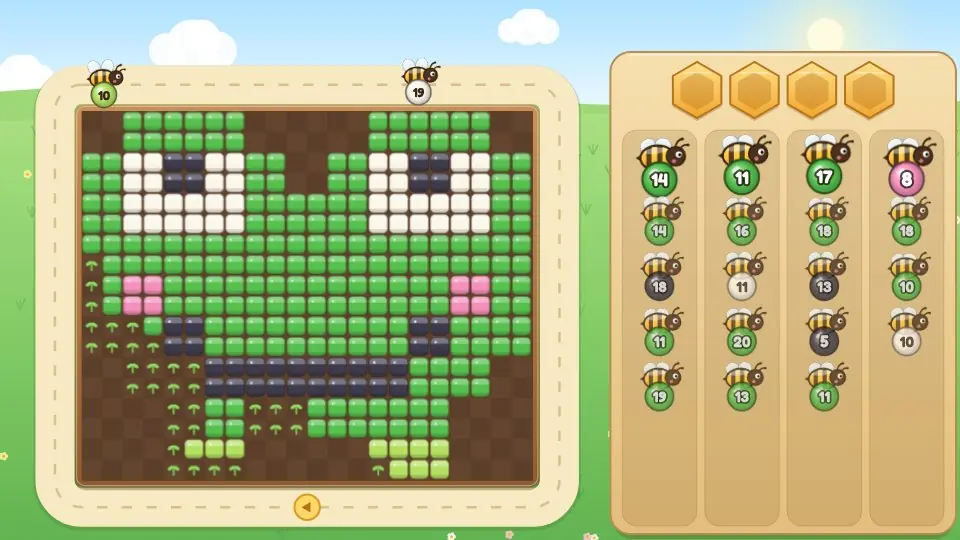
In Honeyloop a picture made of coloured pollen sits in a garden bed, and a line of bees waits to clear it. We tap a bee, it flies one loop around the picture, and it takes pollen of its own colour from every edge it passes. Choose the order well and the whole picture clears and bursts into bloom.
This is our guide to playing Honeyloop. Want to jump straight in? Play Honeyloop right here in your browser.
Missing something you need? Tell us.
Quick answers
Do I need an account to play Honeyloop?
No. Just open it and play, with no sign-up. If you like, a free account (username only, no email, for players 13 and older) puts your scores on the leaderboards and backs up your progress so it follows you to any device.
Is there a daily challenge in Honeyloop?
Yes. Honeyloop has a new daily challenge every day, the same one for every player, with its own daily leaderboard. Find it alongside the others on our daily challenges page.
Does Honeyloop save my progress?
Yes. It saves on this device on its own, so you can close the page and pick up where you left off. Sign in with a free account to keep the same progress on your phone and your computer.
Is Honeyloop OK for kids?
Yes, players of any age can enjoy it. There is no chat and no way to message other players, and nobody needs an account to play. Accounts are for players 13 and older, so younger players just play and their progress stays on their device. For ages 4 to 11 we also have learning games in their own kids area, with no ads, no accounts and no tracking.
What kind of puzzle is Honeyloop?
It is a colour sorting puzzle with moving parts. The picture is a grid of small coloured squares. Each bee carries a ball of one colour and a number, which is how much pollen it can still hold. A bee can only take pollen that matches its ball, and only the pollen it can see from the path: the first square in each row and column as it flies past.
So the picture is peeled from the outside in, one colour at a time. The puzzle is deciding which bee goes next, because a bee whose colour is still buried flies a whole loop for nothing and then needs somewhere to rest.
How to play
- Tap a lane to send its front bee. It joins the loop at the arrow below the picture and flies once around.
- As it passes a row or column, it takes the nearest pollen there if the colour matches its ball. The number on the ball counts down.
- At zero the bee is full and heads home. The honey jar at the top shows how much of the picture is cleared.
- A bee that finishes its loop with room left lands on a honeycomb. Tap it to send it round again.
- If every honeycomb is full when a bee needs to land, the round ends.
- Clear every square and the bed blooms into flowers in the colours of the picture.
Controls
| On | Send a waiting bee | Send a resting bee |
|---|---|---|
| Phone or tablet | Tap its lane | Tap its honeycomb |
| Mouse | Click its lane | Click its honeycomb |
| Keyboard | 1, 2, 3, 4 for the lanes | Q, W, E, R, T, Y for the honeycombs |
The lamp button (or H) rings a good bee to send right now. The arrows button makes the bees fly faster. Escape or P pauses.
Bees working together
Up to five bees can be in the air at once, and this is where the fun is. A bee flying ahead clears squares, and the bee behind it sees what was underneath. Send green just ahead of pink and the green bee can open the way for the pink one in the same loop.
The other half of the skill is patience. Every bee in the air that cannot fill up will need a honeycomb, so sending five at once is quick but risky. Two or three well chosen bees usually beat five hopeful ones.
Stars and the second chance
| Stars | How to earn them |
|---|---|
| Three | Two or more honeycombs stayed free the whole time |
| Two | One honeycomb stayed free |
| One | The picture was cleared |
If the honeycombs fill up, we can add one extra honeycomb and carry on from where we were, once per round. A round finished that way earns one star. Or start the picture over and go for three.
Pictures, chapters and the gallery
| Chapter | Pictures | What changes |
|---|---|---|
| Meadow | 1 to 12 | Two then three lanes, five honeycombs, simple shapes like a daisy, a tulip and a ladybird |
| Orchard | 13 to 24 | Four lanes, bigger pictures and more colours: fruit, a snail, a bluebird |
| Pond | 25 to 36 | Four honeycombs on most pictures and the trickiest orders: a frog, a duckling, a fox, an owl |
Every fourth picture is a mosaic, a kaleidoscope pattern with rings of colour that have to come off in the right order. Finished pictures fill in the gallery, and any of them can be replayed.
The Daily Bloom
Each day brings one new mosaic that is the same for everyone. The score starts high and drops a little for every bee that has to rest and for every second on the clock, with a bonus for keeping two honeycombs free. The best score of the day goes on the daily leaderboard, and a new picture arrives at midnight, your time.
Honeyloop tips
- Look at the outside of the picture first. Whatever colours are on the edges are the bees to send.
- Check the number. A bee carrying 18 will not fill up from six squares, so expect it back on a honeycomb.
- Finish what is started. A resting bee that can gather now is nearly always a better choice than a new bee from a lane.
- Sometimes the bee we need is second in its lane. Sending the front bee to a honeycomb is fine, as long as there is room for it.
- Pair them up. Send the colour on the outside, then straight after it the colour just underneath.
- When in doubt, tap the lamp. It shows a bee that can gather pollen right now.
Questions
Is Honeyloop free?
Yes. It's free in your browser with nothing to download.
Can every picture be cleared?
Yes. Each picture's line of bees is worked out by playing it through first, so there is always an order that clears it with honeycombs to spare.
Why did a bee come back without any pollen?
Its colour was not on the outside of the picture yet. A bee only takes the first square it can see in each row and column, and only if the colour matches.
What ends a round?
A bee finishing its loop with room left when every honeycomb is already taken. Adding one extra honeycomb lets the round carry on, once.
How are three stars earned?
Clear the picture while always keeping at least two honeycombs free.
Does Honeyloop work on a phone?
Yes. It plays upright or sideways on phones and tablets, and with a mouse or keyboard on a computer.
What other free puzzle games are like Honeyloop?
If you enjoy Honeyloop, try Gentian Gondola, Jelly Jars (color sort puzzle game) and Thimbleberry Stitch (color by number game). They're all free in your browser too, and the Puzzle Games page lists every one.
Related guides
 How to play Gentian GondolaColor boarding puzzle
 How to play Jelly JarsSort puzzle
 How to play Thimbleberry StitchColor by number
 How to play Mosaic LogicPicture logic
 How to play Bloom BlocksBlock puzzle
More to read
You might also like
10 minSavesGentian Gondola
Color boarding puzzleWalk hikers out of the crowd into gondola cabins of their color. Two or three cabins wait at once, so plan who goes where and keep the bench clear, over 180 mountain levels and a Daily Climb.