
Games / Puzzle Games / Crayon Meadow / Guide
How to play Crayon Meadow
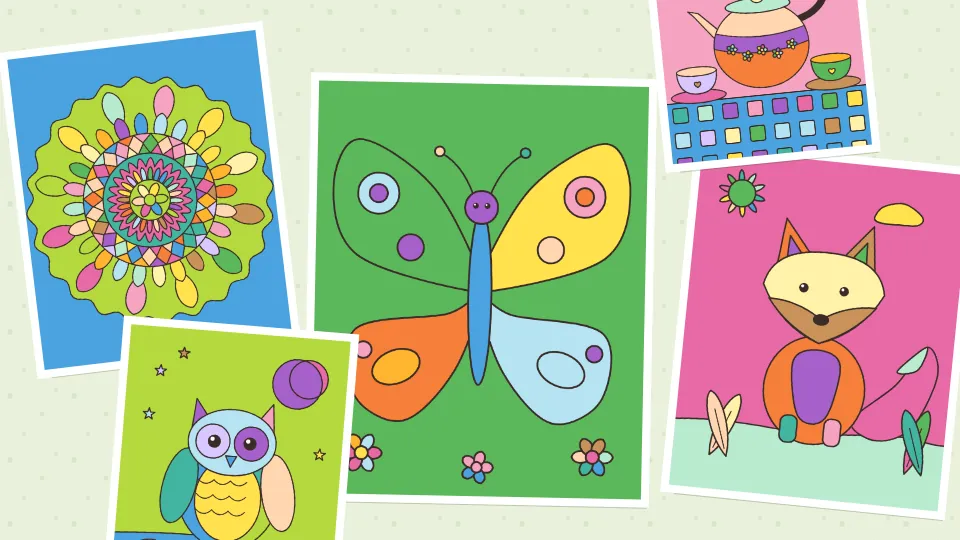
Crayon Meadow is our book of free coloring pages online: friendly animals, gardens, mandalas and cozy little scenes, drawn by us, that you color any way you like with a tap to fill or a soft brush.
This is our guide to playing Crayon Meadow. Want to jump straight in? Play Crayon Meadow right here in your browser.
Quick answers
Does Crayon Meadow work on my phone?
Yes. Crayon Meadow works with touch on phones and tablets, and with a mouse or keyboard on a computer. It runs in the browser you already have, so there is no app to download.
Do I need an account to play Crayon Meadow?
No. Just open it and play, with no sign-up. If you like, a free account (username only, no email, for players 13 and older) puts your scores on the leaderboards and backs up your progress so it follows you to any device.
Is there a daily challenge in Crayon Meadow?
Yes. Crayon Meadow has a new daily challenge every day, the same one for every player, with its own daily leaderboard. Find it alongside the others on our daily challenges page.
Free coloring pages, online and calm
We wanted free coloring pages online that feel like a quiet half hour with a box of crayons. There are no numbers to match and no wrong colors. A purple sun and a striped fox are both lovely. Pick a color, tap a space, and it fills right up to the lines. Nothing leaks into the next space, so even tiny petals on a mandala come out clean.
Crayon Meadow plays free in your browser on a phone, tablet or computer, with nothing to download. There's no timer and no score to lose. Every page saves itself after each step, so you can close the tab halfway through a teapot and finish it tomorrow.
How to play
Open a page from Coloring pages, or tap Page of the Day on the title screen. The colors sit in a strip under the page, and the tools sit just above them.
- Fill: tap any space and it fills with the chosen color. Tap it again with another color to change your mind.
- Brush: paint freely with one finger or the mouse. With Stay inside the lines on (it starts on), each stroke stays inside the space where it began, so shading a cheek never smudges the face around it.
- Eraser: tap a space to bring back white paper, or rub with it like a brush.
- Size: small, medium or large brush. In kids mode every size is bigger.
- Undo and Redo: the big Undo at the top takes back the last step, as many steps as you like. Redo puts it back. Undo still works after you close the page and come back.
- Done: hangs the page in your gallery.
Zooming in on small spaces
On a phone, pinch with two fingers to zoom in, and drag with two fingers to move around. Two fingers never paint, so you can't leave a stray mark while you look closer. With Fill chosen, one finger can drag the page too. Fit shows the whole page again.
On a computer
Click to fill, drag to paint, and use the mouse wheel to zoom. Keys: F fill, B brush, E eraser, Z undo, Y redo, the plus and minus keys zoom, 0 fits the page. Click the page and the arrow keys move a little pointer, and Enter fills where it sits. Escape closes any panel or opens the menu.
The pages
There are 46 pages in the book, every one drawn in code by us. They come in three kinds, and the library has tabs for each theme.
- Big spaces: twelve pages with thick lines and large shapes for little hands, like the Sunny Flower Pot, Happy Fish, Rainbow Day and the Teddy Bear Picnic.
- Cozy pictures: a fox in the ferns, an owl on a branch, a cat with a ball of yarn, a cottage garden, a sailboat, a busy beehive, a cactus shelf and more.
- Patterns: mandalas, patchwork quilts, garden windows, painted tiles and flower wreaths, with lots of small spaces for a slow, relaxing session.
Kids mode, on the title screen or in Settings, puts the big space pages first, makes the color swatches and brushes bigger, and keeps every brush stroke inside the lines.
Colors
The strip under the page holds a full set of colors, and the button at its left end flips between five sets: Meadow, Pastel, Sunset, Ocean and Woodland. The rainbow button opens More colors, with twelve color families and eight shades of each, plus grays. Colors you pick there stay at the front of the strip for this page and the next.
The Page of the Day
Every day there's a new Page of the Day, the same page for everyone. On some days it's a page from the book, and on others it's a mandala, quilt, window, tile or wreath pattern made just for that date, which you won't find anywhere else. It changes at your own midnight.
Finish it the same day and it counts toward your daily trophies, with a score for how much of the page has color. There's no rush and no penalty. If you finish it tomorrow, it simply joins the gallery like any other page.
Your gallery
Tap Done and the page goes into the gallery, kept on your device. Tap any picture there to save it as a PNG to your device, keep coloring it, or remove it. Saved pictures are crisp, at 1600 by 2000 pixels, so they print nicely. Nothing is uploaded and there's no account.
There are also three small goals each day, like finishing a page or using eight colors on one page, and twelve badges to collect over time.
Tips for lovely pages
- Color the background last. A sky or a wall in a soft pastel makes bright animals stand out.
- Pick three or four colors that go together, then add one surprise color for small details.
- On mandalas, color by rings: every space in a ring the same color makes the pattern bloom.
- Use the brush with Stay inside the lines on to add shading: a darker shade along one side of a fill looks like light falling from the other side.
- Zoom in for the tiny spaces. A tap at a comfortable size is much easier than hunting for a petal at full page size.
If you like turning pictures into color one square at a time, our cross-stitch game Thimbleberry Stitch is color by number instead, and Mosaic Logic reveals pictures with a little logic.
Questions
Are these coloring pages really free?
Yes. Every page, the Page of the Day and the gallery are free in your browser, with no download and no account.
Can I save my coloring as a picture?
Yes. Tap Save picture on the finished card, in the menu, or on any picture in the gallery, and a PNG goes to your device.
Is it good for kids?
Yes. Turn on kids mode for pages with big spaces, bigger color swatches and brushes, and strokes that stay inside the lines. There's no timer and nothing scary.
Does my coloring save if I close the page?
Yes. Every step saves on your device, so Continue on the title screen brings back the page exactly as you left it, Undo included.
Is there coloring by numbers?
No. This is free coloring: any color in any space. For color by number, try Thimbleberry Stitch.
Can I print the pages?
Save the finished page as a picture and print that. It comes out at 1600 by 2000 pixels.
Related guides
 How to play Thimbleberry StitchColor by number
 How to play Mosaic LogicPicture logic
 How to play Teasel TidyTidying game
 How to play Moon JarDrop and merge
 How to play Jelly JarsSort puzzle