Games / Puzzle Games / Sevenleaf / Guide
How to play Sevenleaf
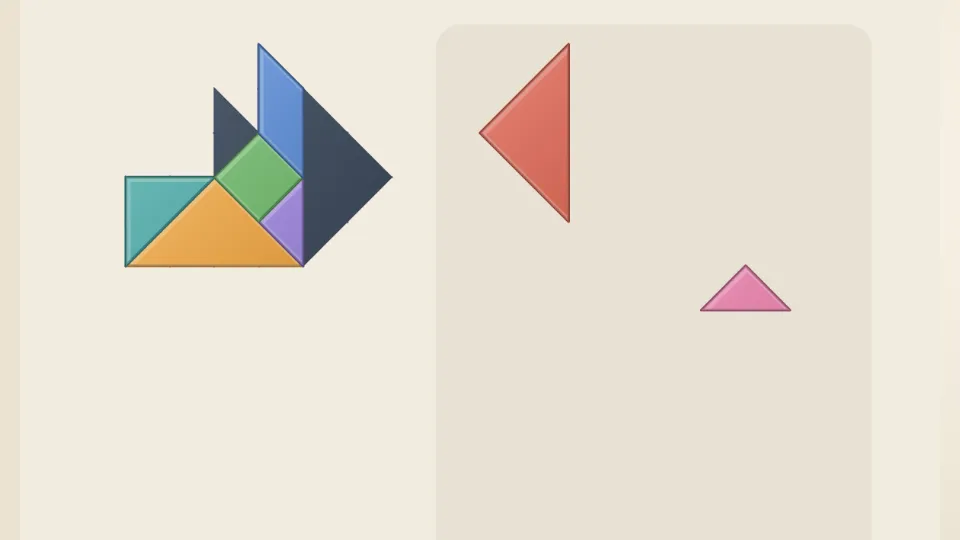
A tangram is a square cut into seven pieces: two big triangles, a medium triangle, two small triangles, a square and a parallelogram. In Sevenleaf you slide and turn all seven to fill a dark silhouette exactly, with nothing left over and nothing overlapping. The first shapes show where every piece goes, and later ones give you just the outline.
This is our guide to playing Sevenleaf. Want to jump straight in? Play Sevenleaf right here in your browser.
Missing something you need? Tell us.
Quick answers
Does Sevenleaf work on my phone?
Yes. Sevenleaf works with touch on phones and tablets, and with a mouse or keyboard on a computer. It runs in the browser you already have, so there is no app to download.
Do I need an account to play Sevenleaf?
No. Just open it and play, with no sign-up. If you like, a free account (username only, no email, for players 13 and older) puts your scores on the leaderboards and backs up your progress so it follows you to any device.
Does Sevenleaf save my progress?
Yes. It saves on this device on its own, so you can close the page and pick up where you left off. Sign in with a free account to keep the same progress on your phone and your computer.
What is a tangram?
The tangram is a very old dissection puzzle. Seven flat pieces cut from one square can be rearranged into thousands of shapes: animals, people, boats, houses and plenty of abstract figures. The rules are always the same. Use every piece, lay them flat, let them touch but never overlap.
Sevenleaf builds each silhouette from a real arrangement of the seven pieces, so every shape can be made. There is often more than one way to fill it, and any way that fits counts.
How to play
- Drag a piece from the tray onto the silhouette. It clicks onto the grid when you let go.
- Tap a piece to turn it a quarter turn, or tap Turn to turn the piece you touched last. On a computer, press R or Space.
- Flip mirrors the parallelogram. It's the only piece that looks different when flipped. On a computer, press F.
- Hint puts one piece in its place and moves anything in its way back to the tray.
- Reset puts every piece back in the tray.
- The puzzle is solved when all seven pieces fill the silhouette exactly.
Chapters and stars
| Chapter | Puzzles | What you get |
|---|---|---|
| Guided | 1 to 20 | Dotted lines show where every piece goes |
| Half guided | 21 to 40 | Lines for the big pieces, the medium triangle and the parallelogram |
| A little help | 41 to 60 | Lines for the two big triangles |
| Just the shape | 61 to 80 | Only the silhouette |
| Tricky shapes | 81 to 100 | Busier outlines with more corners |
| Master shapes | 101 to 120 | Simple outlines, which are the hardest of all |
| Pictures | After any 8 puzzles | Named shapes to build: a heart, a cat, a rocket, a tulip and more. The first few show the big triangles |
Solve with no hints for three stars, with one hint for two, and with more for one. Finishing a puzzle opens the next, and you can replay any of them.
The Daily Shape
Everyone gets the same silhouette each day, with no guide lines. Your first solve goes on the leaderboard: you start at 1,000 points, lose 2 for every second and 150 for each hint.
Tangram tips
- Place the two big triangles first. Together they cover half the shape, so their spot is usually the easiest to see.
- Look for sharp corners in the silhouette. A 45 degree point almost always belongs to a triangle.
- A long thin strip is often the parallelogram, or two small triangles side by side.
- The square and the two small triangles are your fillers. Save them for the last gaps.
- If the last piece won't fit, swap the two small triangles or flip the parallelogram before moving everything.
- Simple outlines like a plain square are the hardest, because they give you the fewest clues.
Questions
Is Sevenleaf free?
Yes. It's free in your browser with nothing to download.
Can every shape be solved?
Yes. Each silhouette was made from a real arrangement of all seven pieces, and any arrangement that fills it exactly counts.
Do I have to use every piece?
Yes. All seven pieces are used in every shape, and none may overlap.
Why can't I turn pieces at an angle?
Pieces turn in quarter turns and click onto a grid, which keeps every edge lined up and makes it easy to fit pieces snugly. Every Sevenleaf shape is built that way.
Is there a daily tangram?
Yes. The Daily Shape is the same for everyone each day, with a leaderboard for your first solve.
Is it good for kids?
Tangrams are a classic way to practise shapes and spatial thinking, and the guided chapter is a gentle start for any age.
Related guides
 How to play CagewiseMath logic puzzle
 How to play Mosaic LogicPicture logic
 How to play Jelly JarsSort puzzle
 How to play ArrowmereArrow puzzle
 How to play Bloom BlocksBlock puzzle