
Games / Puzzle Games / Linden Lookout / Guide
How to play Linden Lookout
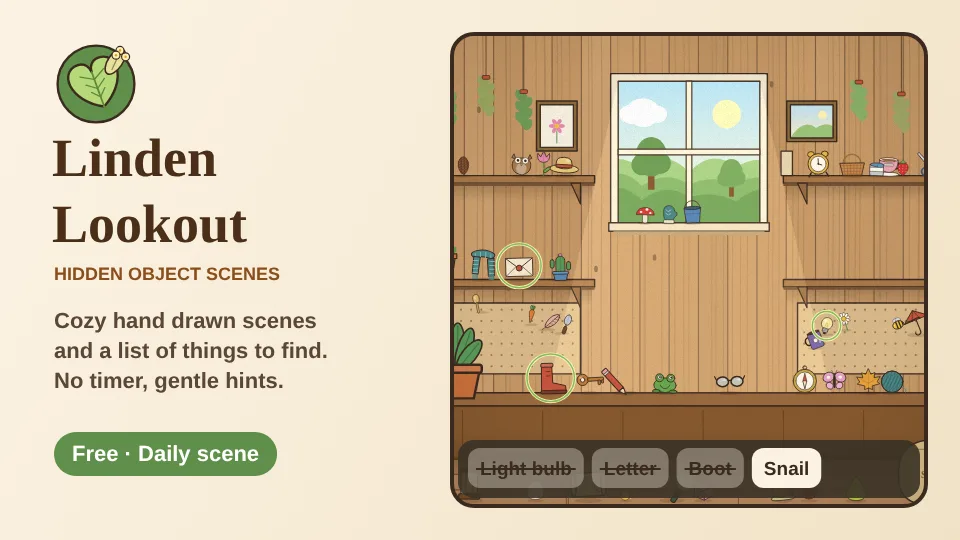
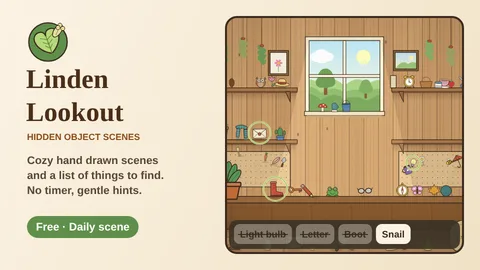
Linden Lookout is a calm hidden object game. Each scene is a cozy hand drawn place full of little things, and we hand you a list of what to find. Spot one, tap it, and it flies off to your list.
This is our guide to playing Linden Lookout. Want to jump straight in? Play Linden Lookout right here in your browser.
Quick answers
Do I need an account to play Linden Lookout?
No. Just open it and play, with no sign-up. If you like, a free account (username only, no email, for players 13 and older) puts your scores on the leaderboards and backs up your progress so it follows you to any device.
Is there a daily challenge in Linden Lookout?
Yes. Linden Lookout has a new daily challenge every day, the same one for every player, with its own daily leaderboard. Find it alongside the others on our daily challenges page.
Does Linden Lookout save my progress?
Yes. It saves on this device on its own, so you can close the page and pick up where you left off. Sign in with a free account to keep the same progress on your phone and your computer.
What is Linden Lookout?
Hidden object games are picture puzzles: a busy scene, a list of things tucked away in it, and the quiet fun of spotting each one. Linden Lookout is ours. We paint every scene in code, from a sunny potting shed with seed packets on the shelves to a lamplit reading nook with a sleepy moon in the window, a harbor dock, a sewing corner, a picnic under an old oak, a toy attic with rain on the roof and a tea room with cakes under glass.
Because the pictures are built from separate little drawings, we can hide things in new places every time you visit. A scene you have played ten times still has a fresh list and fresh hiding spots. It's free, it runs in your browser on a phone, tablet or computer, and there's nothing to download.
The name comes from the linden tree, the lime tree of old village greens, with heart shaped leaves and sweet smelling flowers in early summer. A lookout under a linden felt like the right spot for a quiet look around.
How to play
Your list sits under the scene on a phone and beside it on a wider screen. Look for each thing on the list and tap it when you see it. A found thing sparkles, lifts out of the picture and lands on its list card with a green tick. Find everything to finish the scene.
- Look closer: pinch with two fingers, double tap an empty spot or press the + button, then drag to look around. On a computer, scroll to zoom and drag with the mouse. Small arrows at the edges show where there is more scene to see.
- No penalty for a wrong tap: a miss just makes a soft ripple. If you tap a lot of empty spots very quickly, we pause taps for about a second and suggest a slower look. That's all.
- No clock: there is no timer on screen. We note your time on the result card, and it only matters for the Daily scene.
Your first visit starts right away with a gentle round in the Potting Shed: six big things to find and a short tip at the top. The next two scenes ease you in with six and then seven things and a little less clutter, and the result card shows when today's Daily scene is waiting.
Words, Shapes, Pictures and Riddles
Pick how the list looks when you open a scene. You can change it any time in Settings.
- Words shows the name of each thing, like Watering can or Pocket watch.
- Shapes shows a dark outline of each thing. Tap an outline to see its name.
- Pictures shows small colored drawings and asks for six things that are a little bigger, with extra room for a tap that lands close by. It's the one to pick with a younger finder on your lap.
- Riddles gives a little clue instead of a name, like "Carries its house on its back" or "Always knows which way is north". The name appears once you find it. Riddle lists are a touch shorter, from six things at level 1.
The lantern hint
The lantern button in the top bar holds up to three hints. Use one and a warm glow appears round one of the things still on your list, and the view glides over to it if it was off screen. A used hint comes back every 45 seconds, and the little bar under the button shows how close the next one is.
Hints are free in every scene. In the Daily scene each hint adds 20 seconds to your time on the board.
Levels and lantern nights
Every scene starts at level 1 with eight things to find. Every second time you finish a scene it moves up a level, to a top level of 5 with twelve things to find, more clutter and slightly smaller things. The dots on each scene card show its level.
When a scene reaches level 3 you can switch on Lantern night when you open it. The lights go out and you carry a lantern: touch or point anywhere to hold it up and look round in a pool of warm light. Every Sunday the Daily scene is a lantern night too.
New scenes open as you go: the Potting Shed and the Reading Nook are open from the start, and the Sewing Corner, Harbor Dock, Meadow Picnic, Toy Attic and Tea Room open after 2, 4, 7, 10 and 14 finished scenes.
Collections: keepsakes, the Finds book and Daily flowers
Each scene has a set of six keepsakes, little gold medallions of things that belong there, like the snail and seed packet from the Potting Shed or the anchor and starfish from the Harbor Dock. Every finished scene gives you one, and we always pick one you're missing while the set has gaps. A full set puts a golden frame round that scene's card. Open Collections on the home screen to see them all, along with how many scenes, things, hazelnuts and dailies you've found.
One golden hazelnut is tucked into every scene. It isn't on the list and it's small. Spot it for a free hint and a second keepsake from that scene.
The Finds book keeps every kind of thing you've spotted, over a hundred in all, with dark outlines for the ones still waiting. Tap one to see which scenes it likes to hide in. Daily flowers is a calendar for the month: every Daily scene you finish presses a flower onto its day.
The Daily scene
Every day at midnight, your time a new Daily scene appears on the home screen, the same for everyone: the same scene, the same ten things and the same hiding spots. Most days use Words, Tuesdays, Thursdays and Saturdays use Shapes, and Sundays are a lantern night. During a seasonal visit, every other Daily is the seasonal scene.
Your Daily time goes on the daily leaderboard (each hint adds 20 seconds), and finishing on back to back days builds your streak. After you finish you can play the same scene again just for fun, and you can share your time with friends. Missed a day? The catch up strip under the links lets you play the last week of dailies just for fun.
Seasonal scenes
Some scenes only visit for part of the year, by the date on your own device. The Harvest Kitchen is open from November 16 to November 30, with pumpkins, pies, corn and a warm stove. The Winter Cabin follows from December 14 to January 6, with snow at the window, a crackling fire, gingerbread and candy canes. A few weeks before a seasonal scene opens, its card shows the date it arrives. Its keepsakes stay in your collection after it leaves.
Tips for sharp eyes
- Start with the big things on the list and save the small ones (rings, coins, buttons, thimbles) for a closer look.
- Sweep the scene in rows: shelves first, then the table or floor, then the corners. Things stand on shelves, tables, sills and floors, and loose things lie on rugs, grass and dock planks.
- Look at the edges of the leaves and the arm of a chair. Some things are tucked partly behind them, but never more than a small part.
- Colors help. A yellow star on pale wood or a green frog in the grass is hiding in plain sight, so think about where a color would blend in.
- Zoom in on one corner and pan slowly. On a phone the scene is wider than the screen, and the edge arrows tell you there's more to the side.
- Save your lantern for the last one or two things. It refills while you play, so there's no need to hoard it either. If you go 40 seconds without a find, the lantern button glows to remind you it's there.
- Riddles get easier once you think about where a thing lives: a riddle about the sea points to the dock, one about baking to the kitchen.
Controls
| Action | Phone or tablet | Computer |
|---|---|---|
| Find a thing | Tap it | Click it |
| Zoom | Pinch, or the plus and minus buttons | Scroll wheel, or the plus and minus keys |
| Look around | Drag | Drag or arrow keys |
| Hint | Lantern button | Lantern button or H |
| Tap the middle ring | Enter after using the arrow keys | |
| Back to home | Home button | Home button or Esc |
In Settings you can turn the sound and the scene ambience (birds, waves, a ticking clock or a warm stove) on or off, choose the list style, switch on Bigger list for larger words and pictures, pick a language (the game switches to Korean by itself on a Korean phone or computer) and switch on Less motion, which turns off the flying, the sparkles and the little moving touches in each scene, like snow at the window.
Questions
Is Linden Lookout free?
Yes. It's free to play in your browser on a phone, tablet or computer, with nothing to download.
Is there a time limit?
No. There is no clock on screen and no way to run out of time. We only note your time for the Daily scene leaderboard.
Do wrong taps cost anything?
No. A wrong tap just makes a ripple. Lots of quick misses in a row pause taps for about a second, with no other penalty.
Is it good for kids?
Yes. Pick Pictures when you open a scene: the list shows small colored drawings and asks for six bigger things.
Do the objects move each time?
Yes. Every visit to a scene picks a new list and new hiding spots. Only the Daily scene is the same for everyone that day.
When does the Daily scene change?
At midnight (your time). Everyone gets the same scene, list and hiding spots that day.
Can I play Linden Lookout on my phone?
Yes. Linden Lookout runs in your browser on a phone, tablet or computer, with nothing to install and no sign up. Your progress saves on your device, and a free account keeps it on every device.
What other free puzzle games are like Linden Lookout?
If you enjoy Linden Lookout, try Pennywort Peek (spot the difference game), Curio Corner (shelf sort puzzle game) and Mahjong Cloud Steps (mahjong solitaire game). They're all free in your browser too, and the Puzzle Games page lists every one.
Is there a reward for finding things quickly?
Yes, a small one. When you spot things less than six seconds apart they make a quick chain, and a little word pops up over each find. There's no timer pushing you, though. The card at the end of a scene shows your longest chain and your best time in that scene, so there is always something gentle to beat next time.
Related guides
 How to play Pennywort PeekSpot the difference
 How to play Curio CornerShelf sort
 How to play Mahjong Cloud StepsMahjong solitaire
 How to play Moon JarDrop and merge
 How to play Jelly JarsSort puzzle
More to read
You might also like
2 minSavesPennywort Peek
Spot the differenceTwo storybook pictures, a few small changes. Find them all at your own pace across twelve painted places, from a garden to a starry night: a storybook path with stars, endless new pictures and a Daily Peek.