
Games / Strategy Games / Corner to Corner / Guide
How to play Corner to Corner
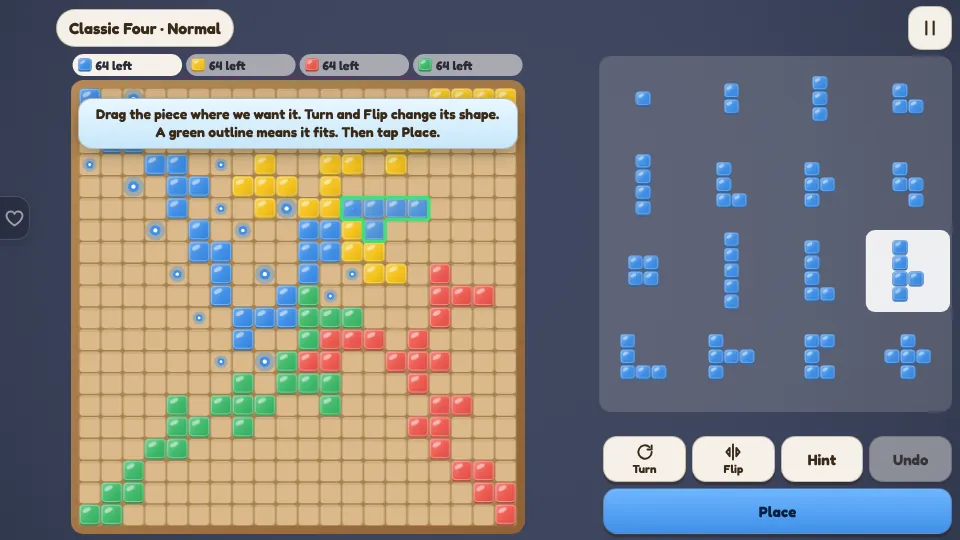
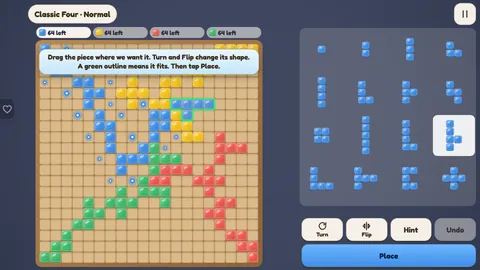
Corner to Corner is a block strategy board game for 2 to 4 players, free to play online. Everyone has the same 21 pieces made of one to five squares. Our pieces may touch each other only at the corners, never along a side, while we squeeze into the space the other colors leave. It takes one minute to learn, and the board looks different every game.
This is our guide to playing Corner to Corner. Want to jump straight in? Play Corner to Corner right here in your browser.
Quick answers
Do I need an account to play Corner to Corner?
No. Just open it and play, with no sign-up. If you like, a free account (username only, no email, for players 13 and older) puts your scores on the leaderboards and backs up your progress so it follows you to any device.
Is there a daily challenge in Corner to Corner?
Yes. Corner to Corner has a new daily challenge every day, the same one for every player, with its own daily leaderboard. Find it alongside the others on our daily challenges page.
Is Corner to Corner OK for kids?
Yes, players of any age can enjoy it. There is no chat and no way to message other players, and nobody needs an account to play. Accounts are for players 13 and older, so younger players just play and their progress stays on their device. For ages 4 to 11 we also have learning games in their own kids area, with no ads, no accounts and no tracking.
What kind of game is it?
It is a territory game played with polyomino pieces: one single square, one piece of two squares, two of three, five of four and twelve of five. Four colors start in the four corners of a 20 by 20 board and grow toward the middle. Nothing is ever captured or removed. The skill is in keeping our own corners open while closing off everyone else's.
How to play
- Our first piece must cover our starting square.
- Every piece after that must touch at least one of our own pieces at a corner.
- Our pieces may never touch each other along a side. Touching other colors along a side is fine.
- Players take turns placing one piece. A color with no room left sits out for the rest of the game.
- The game ends when nobody can place a piece.
Controls
| On | Pick a piece | Move it | Turn and flip | Place |
|---|---|---|---|---|
| Phone or tablet | Tap it in the tray | Drag it on the board. It floats above the finger | Turn and Flip buttons, or double tap the piece | Place button |
| Mouse | Click it in the tray | Drag it, or click a square | Turn and Flip buttons, or double click | Place button |
| Keyboard | 1 to 9 and letters | Arrow keys | R turns, F flips | Enter. H hint, U undo |
A green outline means the piece fits and a red one means it does not. Glowing dots mark every corner where our next piece could start. With snapping on, a piece dropped near a spot that fits slides into it.
Scoring
| What | Points |
|---|---|
| Each square left in pieces we could not place | Minus 1 |
| Placing all 21 pieces | Plus 15 |
| And the single square was our last piece | 5 more |
The highest score wins. Settings has a simpler way to score for young players: one point for every square placed.
The ways to play
- Classic Four: us against three house players on the full board, at Easy, Normal or Hard.
- Duo: one rival on a 14 by 14 board, starting near the middle. Or the full board with two colors each.
- Pass and Play: 2 to 4 people share one device, with a screen between turns to hand it over.
- Daily Puzzle: a board already in play and 5 to 8 pieces to fit. Everyone gets the same one each day.
- Puzzles: 60 puzzles in four sets. Some fill a shape exactly. Others fit the last pieces into a busy board.
Corner to Corner tips
- Play the big five square pieces first. Small pieces fit almost anywhere late in the game.
- Head for the middle in the first few turns. The middle touches everyone's space.
- Count corners. Each new piece should leave us more places to grow, not fewer.
- Block with our sides. Another color cannot use a corner if our piece sits in the square it needs.
- Slip through gaps. Two pieces of another color that touch only at a corner leave a diagonal door.
- Save the single square. It fits in the tightest corner, and placing it last earns the extra 5.
- Near the end, work out which pieces still fit somewhere, and place the hardest one first.
Questions
Is Corner to Corner free?
Yes. It's free in your browser with nothing to download.
Can I play on my phone?
Yes. The piece floats above the finger while we drag, big Turn and Flip buttons sit below the board, and a piece only drops when we tap Place.
Does it save my progress?
Yes. Stats, puzzle stars, looks and a game in progress against the house players are saved on the device.
Can my pieces touch on the sides?
Not our own. Two pieces of the same color may only touch at their corners. Pieces of different colors may sit side by side.
How is it scored?
Each square we could not place costs a point. Placing all 21 pieces earns 15, and 5 more if the single square went down last.
Can I play with family on one tablet?
Yes. Pass and Play is for 2 to 4 people on one device, with no house players.
What is the best first move?
A five square piece that reaches toward the middle of the board. Long or zigzag shapes cover the most ground and leave corners pointing inward.
Related guides
 How to play Bloom BlocksBlock puzzle
 How to play Rosehip ReversiReversi
 How to play Airscape Chinese CheckersChinese checkers
 How to play TilewoldTile landscape builder
 How to play Wool GatesBlock jam
More to read
You might also like
10 minSavesRosehip Reversi
ReversiTrap a line of discs and flip it your way. Five house players up to a strong expert, hints, undo and a game review, pass and play, online with a friend and a Daily Opening.
10 minSavesAirscape Chinese Checkers
Chinese checkersThe classic marble race on a six pointed star: step or chain hops across the board and fill the point opposite first. Eight house players, a ladder, 41 hop puzzles and the Grand crossing, a Daily crossing, pass and play and friends online with 2 to 6 people on one room code.