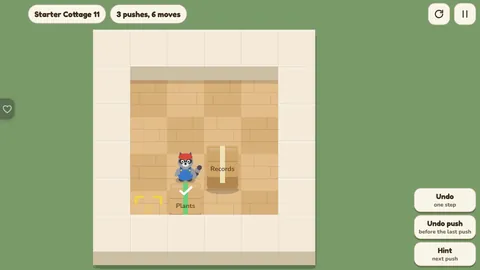
Games / Puzzle Games / Moving Day / Guide
How to Play Moving Day
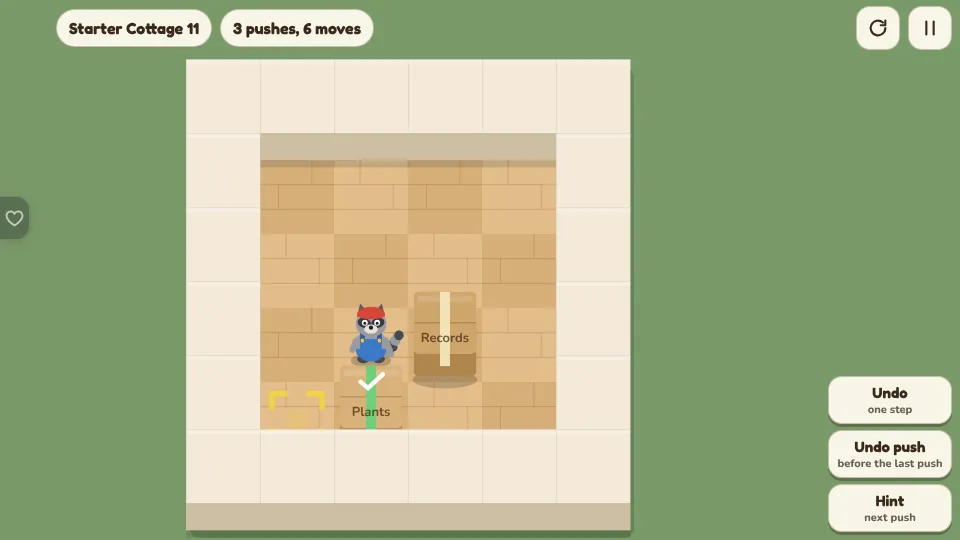
It is moving day, and Rocco the raccoon has a house full of boxes to put in place. Push every box onto a tape mark. Boxes can be pushed but never pulled, and that one rule makes the whole puzzle.
This is our guide to playing Moving Day. Want to jump straight in? Play Moving Day right here in your browser.
Quick answers
Do I need an account to play Moving Day?
No. Just open it and play, with no sign-up. If you like, a free account (username only, no email, for players 13 and older) puts your scores on the leaderboards and backs up your progress so it follows you to any device.
Is there a daily challenge in Moving Day?
Yes. Moving Day has a new daily challenge every day, the same one for every player, with its own daily leaderboard. Find it alongside the others on our daily challenges page.
Is Moving Day OK for kids?
Yes, players of any age can enjoy it. There is no chat and no way to message other players, and nobody needs an account to play. Accounts are for players 13 and older, so younger players just play and their progress stays on their device. For ages 4 to 11 we also have learning games in their own kids area, with no ads, no accounts and no tracking.
What kind of game is it?
Moving Day is a box pushing puzzle, the classic warehouse game where you push every crate onto its spot. Each room is a small grid of floor and walls with some boxes and the same number of tape marks. Rocco walks one square at a time and pushes boxes ahead of him. The room is done when every mark has a box on it.
There are 300 rooms in twelve houses, from tiny cottage rooms with one box to hotel rooms with six, plus a Daily Room that is the same for everyone.
The rules
- Rocco moves up, down, left or right, one square at a time.
- Walking into a box pushes it one square, if the square behind it is empty floor or a mark.
- Boxes cannot be pulled.
- Only one box moves at a time. Two boxes in a row will not budge.
- Any box can go on any mark.
- There is no timer and no limit on steps.
The controls
| We want to | Touch or mouse | Keyboard |
|---|---|---|
| Move one square | Swipe | Arrow keys or W A S D |
| Walk to a square | Tap it | Arrow keys |
| Push a box along a line | Drag the box to where it should go | Arrow keys |
| Undo one step | Undo | Z or Backspace |
| Undo to before the last push | Undo push | U |
| Start the room again | Round arrow, top right | R |
| Hint | Hint | H |
| Pause | Pause button | Esc |
When we drag a box, Rocco walks round to the far side by himself and pushes it. If he cannot get there, or something is in the way, the drag is refused and nothing moves.
Why boxes get stuck
Because a box cannot be pulled, some squares are traps. Learning to see them is most of the skill.
- A corner. A box in a corner can never be pushed out. Unless the corner is a mark, the room cannot be finished.
- A wall. A box against a wall can only slide along that wall. If there is no mark along it, the box is lost.
- Two boxes side by side against a wall. Neither can be pushed away from the wall, and they block each other along it.
- A square of four boxes, or boxes and walls. Nothing in the block can move.
With the warning switched on, a stuck box gets an orange outline and Rocco says so. One tap on Undo push takes it back. The warning only speaks up when it is certain, so a quiet room is not a promise that all is well.
How to plan a room
- Look at the marks first. Decide which mark is hardest to reach, usually the one deepest in a corner or at the end of a corridor, and fill it first.
- Work out which side Rocco must stand on for each push, and whether he can get there.
- Fill far marks before near ones, so a parked box does not block the way to the rest.
- Before pushing a box to a wall, check there is a mark along that wall.
- Sometimes a box has to be moved out of the way first and brought back later.
- When stuck, undo to before the last push and try the other box.
Hints
The hint button shows the next push: a blue outline on the box and an arrow for the direction. It works out the answer from the position we are in, not from a fixed script, so it is right even after we have wandered off.
If the room can no longer be solved from where we are, the hint says how many pushes to undo to get back to a position that can. Hints are free and unlimited. A room solved with no hints gets a small ribbon.
Stars
| Stars | Pushes |
|---|---|
| 3 | The fewest possible, or within one push or 8% of it |
| 2 | Within 40% of the fewest, plus two |
| 1 | Any solution |
Stars count pushes, not steps. Walking around costs nothing. Every room's fewest pushes was found by our solver, so three stars are always possible. Stars open new houses: each one needs 38 stars more than the one before.
Houses and Moving In
| House | Rooms | Boxes in a room |
|---|---|---|
| Starter Cottage | 25 | 1 to 2 |
| Bungalow and Farmhouse | 50 | 2 to 3 |
| Lake Cabin and Townhouse | 50 | 3 |
| Victorian to Ranch House | 100 | 3 to 5 |
| Mansion, Apartment Block, Grand Hotel | 75 | 4 to 6 |
Inside a house, rooms open a couple ahead of the last one solved, so one hard room never blocks the way. Each room we solve moves one piece of furniture into that house. The Moving In screen shows the house cut open, and every piece can be dragged to where it looks best.
The Daily Room
Once a day there is one medium room for everyone. Solving it in the fewest pushes possible scores 1,000, and each extra push takes off 10. Undo is free and does not cost points, so the way to a top score is to explore, undo, and then finish cleanly. The first finish of the day is the score that counts.
Questions
Is Moving Day free?
Yes. All 300 rooms, the Daily Room, hints and undo are free, with nothing to buy.
Does the game save my progress?
Yes. Stars, ribbons, open houses and where we put the furniture are saved on the device after every room. A room left half done is kept too, so the next visit picks up right where we stopped.
Can I play on a phone?
Yes. Swipe to step, tap a square to walk there, or drag a box to push it along a line. It also plays with a mouse or a keyboard.
Can I pull a box?
No. Boxes can only be pushed. That is the heart of every box pushing puzzle: a box against a wall or in a corner cannot be pulled back out.
What do I do when a box is stuck?
Use Undo push to go back to before the push that trapped it. Undo has no limit, and the hint button will say how many pushes to take back.
Is every level solvable?
Yes. Every room was solved by our solver before it went in, and its fewest pushes are stored with it.
How do the stars work?
Stars compare our pushes with the fewest possible. Three stars for matching it or coming within a push, two for a reasonable answer, one for any solution. Steps without a push do not count.
Related guides
 How to play Dock JamUnblock puzzle
 How to play Frost PairsSlide pairs
 How to play Toybox BoltsBolt sort
 How to play ArrowmereArrow puzzle
 How to play Jelly JarsSort puzzle