Games / Arcade Games / Zach's Runway / Guide
How to play Zach's Runway
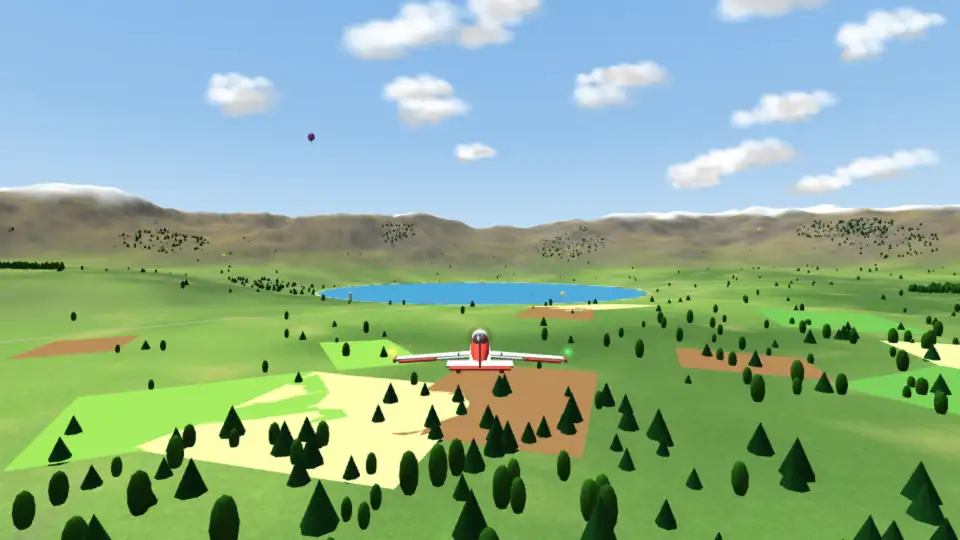
Build your own plane from real parts, then fly it around a 3D valley and out to four more lands beyond the mountains. Pick the body, wings, engine, tail and wheels, and every choice changes how it flies. Take off from Valley Field, chase rings through a river canyon, land on a short strip up on a ridge or splash down on the lake, then cross the mountains to a city, a coast, a snowy plateau and a desert.
This is our guide to playing Zach's Runway. Want to jump straight in? Play Zach's Runway right here in your browser.
Quick answers
Do I need an account to play Zach's Runway?
No. Just open it and play, with no sign-up. If you like, a free account (username only, no email, for players 13 and older) puts your scores on the leaderboards and backs up your progress so it follows you to any device.
Is there a daily challenge in Zach's Runway?
Yes. Zach's Runway has a new daily challenge every day, the same one for every player, with its own daily leaderboard. Find it alongside the others on our daily challenges page.
Does Zach's Runway save my progress?
Yes. It saves on this device on its own, so you can close the page and pick up where you left off. Sign in with a free account to keep the same progress on your phone and your computer.
Is Zach's Runway OK for kids?
Yes, players of any age can enjoy it. There is no chat and no way to message other players, and nobody needs an account to play. Accounts are for players 13 and older, so younger players just play and their progress stays on their device. For ages 4 to 11 we also have learning games in their own kids area, with no ads, no accounts and no tracking.
What is Zach's Runway?
Zach's Runway is a flight game that sits between an arcade game and a real flight simulator. You start in the hangar with a light trainer, and as you earn stars you unlock new parts: a racer body, a glider wing, twin engines, a little jet, floats for the lake and wheels that fold away. Then you take your plane out and fly it.
The flying is close to the real thing. Lift comes from your speed and the angle of the wing, the wing stalls if you ask too much of it, the wind blows you sideways, and a heavy plane takes a long runway to stop. A gentle plane is forgiving and a hot one is quick but twitchy, so building the plane is half the game.
How to play
New pilots start with one big button, Fly now. It goes straight to the runway for a first flight: the game points at the power lever, then the stick, and three golden rings wait straight ahead. Fly through them to earn your first star, then turn around and land back on Valley Field for a bonus score.
Flying help starts on Full, and it looks after a new pilot. The plane will not tip onto its tail or drag a wingtip on the take off roll, it lifts off by itself at flying speed, it eases the nose down before the wing stalls, and it softens a landing that is coming down too fast. The first time you push the stick the other way, the game asks which way should lift the nose and remembers the answer. If two take offs in a row go wrong, the crash card offers to do the next take off for you. A landing coach gives four short tips during your first three landings.
On a computer, the arrow keys fly the plane. The down arrow raises the nose (like pulling the stick back) and the up arrow lowers it; left and right roll the wings. W and S add and take away power, and the number keys set it, 0 for idle and 9 for full. A and D work the rudder, F and R move the flaps, Space holds the brakes, G folds the wheels, T trims the plane, C changes the camera, X turns on a smoke trail and P pauses.
On a phone or tablet, the stick on the left flies the plane and the lever on the right sets the power. Buttons beside them work the rudder, flaps, brakes, trim and camera. A game controller works too: left stick to fly, right stick for rudder, triggers for power.
- Take off: full power, keep the nose on the center line with the rudder, and ease back when the speed tape turns green.
- Turn: roll into a bank, then pull gently so the nose stays up.
- Land: line up a few kilometers out, lower full flaps, use power to hold your speed and the nose to aim at the white marks, then float it down.
There are five cameras: chase, cockpit (with a dashboard and the nose in front of you), wing, the control tower and a free orbit you drag around. A minimap in the corner shows the runways, the next ring and anything left to find.
Flying help has three levels in Settings and on the pause screen. Full, the level new pilots start on, lifts the nose by itself at flying speed, stops stalls and steep banks, keeps the wings level near the ground and lets the wheels take a firmer landing; hold the stick all the way over to roll right round anyway. Some keeps turns tidy and the take off roll straight. Off leaves every bit of the flying to you. The Daily landing flies every help level exactly as it always has, so the board stays fair.
Flying for real: lift, stalls and wind
The readouts show what a pilot watches. Airspeed is on the left in knots, with a red band where the wing stalls and a green band for normal flying. Altitude in feet is on the right, with how fast you are climbing or sinking below it and your height above the ground when you are low. The ball in the middle shows your pitch and bank, and the tape at the top is your heading.
Fly too slowly or pull too hard and the wing stalls: the horn sounds, a wing drops and the nose falls. The cure is the same as in a real plane: push forward, add power and fly again. Flaps let you fly slower for landing, and trim takes the pressure off the stick so the plane holds its nose where you left it.
Four lights beside the runway show your glide path, like at a real airport: two white and two red means you are right on it, more white means too high and more red means too low. The windsock on the field points where the wind is blowing, and in a crosswind you lower the wing into the wind and use the rudder to keep the nose straight.
Building your plane
Each part has real numbers behind it: weight, wing area and span, drag, engine power and how hard each control surface bites. The hangar shows the result as bars for top speed, climb, stall speed, roll and weight, plus a tip on how to fly that build.
- Bodies: Trainer, Sport, Hauler, Racer, Bush plane, Aerobat and Sky bus, a small airliner.
- Wings: Standard, Clipped (rolls fast, lands fast), Glider (floats forever), Biplane (two stacked wings, loads of lift), Delta (fast, lands nose high), High wing (steady, with a clear view down) and Swept (angled back for speed).
- Engines: Small prop, Big prop, Twin props, a quiet Electric motor, a big round Radial, a Turboprop, Twin turbines for heavy planes, a Little jet and Twin jets, the fastest of all.
- Tails: Standard, T-tail, Twin fins and V-tail.
- Wheels: Nose wheel, Tail wheel (steer with the rudder), Floats for the lake, Folding wheels and big soft Tundra tires.
Not in the mood to build? The Planes tab has twelve ready made planes, from the Bush Hopper and the Barn Stormer to the Sky Bus and the Silver Comet. Pick one and fly, or use it as a start and swap the parts.
The Tune tab is where a plane becomes your own. Set the fuel load (light climbs better, full is steadier in wind), the propeller (a climb prop pulls hard at low speed, a cruise prop is faster up high), the control feel from gentle to sharp, and the balance from steady to lively. The bars show what each change does. You can also add wing stripes, a tail number and colored wing tips. The Daily always flies a stock plane, so it stays the same for everyone.
You can save three planes, give each a name (it is painted on the tail) and paint it in two colors. Every plane has a share code like ZR-AB2CD, so a friend can type it in and build the same plane. Under Paint, the surprise button builds a random plane from the parts you have unlocked, always one that climbs well. Save a picture, also under Paint, saves an image of your plane with its name.
Lessons and challenges
Five short lessons teach the basics: taking off, turns and climbs, stalling and recovering, landing, and landing in a crosswind. Twenty four challenges test you. Thirteen are in the valley: a ring run around the valley, a spot landing on a yellow line, the short Ridge Strip, a lake landing (a float plane is lent if yours has wheels), rings through the river canyon, an engine failure high over the airport, a gusty day, a Stunt show scored on loops, rolls and upside down flying, a Parcel drop over the village, the barn and the lighthouse, Balloon pop (ten golden balloons in a loop over the airport, against the clock), a Night landing, a landing in fog, and a touch and go tour that lands on Valley Field, the Ridge Strip and Valley Field again. Six more are out in the far lands: Island hop (a short strip with the sea at both ends), Glacier landing (up a snowy valley to a strip high in the mountains), City lights (a night arrival from the sea), Mesa top (a dirt strip on a table mountain with a cliff at each end), Bridge run (rings along the Sun River and under the big bridge) and the Four lands rally, a long trip past all four far airfields against the clock. Each earns up to three stars, and stars unlock new parts. Five more came with the far isles: a Deck landing on Float One, a floating runway only 320 meters long, Eagle Perch on top of a cliff island, the sand strip on the Coral Keys, a Polar run through falling snow, and a Storm landing at Valley Field with lightning, rough air and a wet runway.
Free Flight lets you take off from Valley Field, the Ridge Strip, the lake or any of the four far airfields, start in the air or on approach, and pick the wind, the sky and the time of day, from morning to night. There are seven skies: clear, cloudy, rain, fog, a thunderstorm with lightning and rough air, snow, and Changing, where the weather moves through while you fly and a rainbow follows the rain. Rain and snow make the runway slippery, so leave more room to stop. Under a gray sky you can climb through the cloud layer and come out on top in the sunshine, with the mountain peaks poking through. Every landing gets a score, and twenty golden balloons are hidden around the valley to find, with a star for every five.
The valley
The valley is a world of its own. Valley Field has a long runway painted like a real one: threshold bars, the runway number, touchdown marks, a center line and the dark rubber left by landing wheels. It has edge lights, green lights at the near end and red at the far end, a flashing light that runs toward the runway to lead you in, approach lights and glide path lights, plus hangars, a control tower with a turning beacon, blue taxiway lights and an apron with taxi lines and a compass rose. To the west is Meadowford, a village with a church and a farm, surrounded by patchwork fields and roads. A short strip sits up on the ridge beside a row of wind turbines, Lake Mira has a dock, a lighthouse and a sailboat, and a river canyon winds away to the south east. Hot air balloons drift overhead and flocks of birds circle the woods.
At night the village windows glow, the lighthouse sweeps the lake and the runway lights lead you home. Your plane has real navigation lights, red on the left wing and green on the right, with flashing strobes and a landing light.
Beyond the valley: four more lands
Fly over the mountain ring and the world opens up. The whole map is 18 kilometers across with the sea all round it, and each side has a land of its own with its own airfield. Out here the marker points at the nearest airfield, so there is always somewhere to land.
- Sunridge City, east: a skyline with a tall spire, a big wheel that turns, a stadium, a red suspension bridge over the Sun River and Sunridge International, a two kilometer runway with airliners at the gates. After dark the windows and street lights come on. The canyon river runs out through the mountains to meet the Sun River, so you can follow the water all the way from the valley.
- Seagull Coast, west: beaches, the harbor town of Port Pelly with its pier and boats, a freighter sailing the coast, and Gull Island with a lighthouse and a short strip.
- Frostpeak, north: a snowy plateau with a glacier valley leading up to a snow strip, the ski village of Pinecrest with a chair lift, a frozen lake and a dome on a peak. On clear nights the northern lights hang in the sky.
- Red Mesa, south: table mountains, a dirt strip on top of one, a rock arch, an old desert town, a race on the salt flat and a balloon meet.
There are twenty sights to find across the valley and the four lands. Fly close to one, in any flight except the Daily, and it goes in your log; every five earn a star. The World map, in Free Flight, in Stats and on the pause screen, shows where you are, every airfield, the sights you have found and a question mark where each of the others is hiding.
Replays and the tower
After a landing you can watch the replay, with the camera cutting between the tower, the wing and a chase view. A tower controller clears you for takeoff and to land, with the wind, and a voice calls out your height on the way down, just like in a real cockpit. Both can be turned off in Settings, and the Effects switch there turns off the sparkles, confetti and buzzes (reduced motion on your device turns off the sparkles and confetti too).
The Daily landing and leaderboards
Every day there is one Daily landing, the same for everyone: a plane built from that day's parts, a wind, a time of day and an approach, sometimes with the engine off. Your first landing of the day goes on the board. You can fly it again for practice.
A landing is scored out of 1000: how gently you touched down, how close to the white marks, how near the center line, how straight you were pointing, and whether you stopped on the runway. Each bounce takes points away. Sign in to put your Daily score, your best landing and your stars on the leaderboards.
Pilot jobs and new paint
After your first flight a job board appears on the home screen with three small jobs for the day, the same for every pilot: land on the Ridge Strip, make a butter landing, fly 10 km, fly through some rings, earn two stars in a challenge, fly the Daily and more. Each job shows how far along you are, and the Go button takes you straight to the right flight. Jobs fill in from what you fly anyway, so a good Free flight can tick off two or three at once.
Every job you finish counts toward five new paint patterns in the hangar: Lightning, Racing 7, Camo, Sunburst and Gold trim. Finish all three jobs in a day for a gold stamp in your pilot log. New jobs arrive every day at midnight, your time.
The Landing Tour, grades, Wings and the Workshop
Every landing now gets a grade from S down to D, with a report card: a little picture of the runway showing where the wheels touched, how hard we came down in feet a minute, how far off the center line we were, how straight the nose was and how far we rolled before stopping. Each airfield keeps our best landing as a bronze, silver or gold medal (550, 750 and 900 points) in the Logbook.
Charter flights turn the plane into a little airline. Pick a job from the board: a tray of hot coffee for a tower crew, a family trip, a birthday cake, crates of eggs, mail bags, a band or three sleepy puppies, each going from one airfield to another. A coffee cup on the screen shows the comfort of the ride. Sharp pulls, steep turns, bumps and a hard touchdown spill it, and a smooth flight with a soft landing keeps it full. The fuller the cup, the more Wings the job pays. Three charters a day are the same for every pilot and pay extra.
Every pair of airfields is a route, and there are 45 to fly. The route book fills in as you go, with bonus Wings at five, fifteen, thirty and all 45 routes. Wings also build up Valley Field for good: a row of flags, a sign on the hangar roof, a fuel truck, a little cafe, a grandstand whose crowd cheers your best landings, and a balloon festival. You will also meet other planes in the sky now, flying their own way around the valley.
The Landing Tour on the home screen is four approaches in a row at different airfields, the same for every pilot that day, in changing wind, light and weather. The last leg is always the toughest: after dark, gusty, in a crosswind or in the fog. Each landing is graded and the four add up to a tour score out of 4,000.
Every landing earns Wings: more for a better grade, and more again at night, in fog or rain, in wind, on a short strip, with the engine off or on the tour. Landing awards like Greaser (an S grade) and Gold everywhere pay extra. Spend Wings in the Workshop, the last tab in the hangar: shock struts that hold firmer touchdowns, disc brakes, an engine tune, a glass cockpit and paint finishes up to a mirror shine. The glass cockpit adds a flight path marker that shows where the plane is really going, glide path needles, and a touchdown predictor that marks where the wheels will meet the runway. Upgrades never apply to the Daily landing, so its board stays fair for everyone.
Approach gates help us land: soft frames float along the ideal glide path to whichever runway we are lined up with, and the next gate turns green while we are inside it. Just above the runway a FLARE cue tells us to raise the nose gently. Flying through every gate earns a bonus. Gates can be turned off in Settings.
The weekly special, ribbons and smoke colors
Every week one challenge comes back with a twist: at sunset, in the rain, in a crosswind, on a gusty day, after dark or in the fog. It is the same special for every pilot that week, and it shows on the home screen once you have your first star. Flying the special also counts as flying that challenge, so its stars and best time still count.
The first time you finish the special each week you earn a ribbon. Ribbons unlock colors for your smoke trail in the hangar, under Paint: red after one ribbon, blue after two, gold after three and rainbow after five. A new special arrives every Monday at midnight, your time, and the challenges take turns so each one comes round before any repeats.
Tips for great landings
- Get set up early. Be lined up, slowed down and with full flaps at least two kilometers out.
- Fly the approach at about 1.3 times your stall speed. The hangar tip tells you the number for your plane.
- Use power for speed and the nose for your path. If the lights show red, add a little power; if white, take some off.
- Just above the runway, take the power off and raise the nose a little. Let the plane settle; do not dive at the ground.
- Brake once all the wheels are down. Tail wheel planes swing, so keep the rudder busy.
Questions
How do I get better landing grades in Zach's Runway?
Fly through the approach gates, keep the speed steady with full flaps, aim for the white marks, raise the nose gently when the FLARE cue shows, keep the nose straight with the rudder and brake to a stop on the runway. An S grade needs 930 points and no bounce.
What are Wings for?
Wings are earned with every landing and spent in the Workshop, the last tab in the hangar, on upgrades like shock struts, disc brakes, an engine tune, a glass cockpit and paint finishes. Upgrades work everywhere except the Daily landing.
Is Zach's Runway free?
Yes. It is free to play in the browser with no download.
Is it a real flight simulator?
It is a simple one. Lift, drag, stalls, wind, flaps, trim and landing gear all work the way they do in a real plane, but the controls are friendly and you can turn on flying help that keeps turns tidy and stops stalls.
Can I play it on a phone?
Yes. Phones and tablets get an on-screen stick, a power lever and buttons for the rudder, flaps and brakes. It also works with a keyboard or a game controller.
How do I unlock new parts?
Earn stars in the first flight, the lessons and the challenges. Each part shows how many stars it needs, from 1 for the Big prop to 12 for the Little jet, and the menu shows how many more stars the next part needs.
Why did my plane crash on landing?
Usually it came down too fast. Sink rates above about 750 feet a minute break the wheels. Slow down earlier, use full flaps and raise the nose just before touchdown. A wingtip or the nose touching the ground also counts as a crash. With flying help on Full, the wheels take a firmer landing before they break.
Where are the golden balloons?
All around the valley in Free flight: over Meadowford, by the lake and the lighthouse, deep in the canyon, near the ridge and a couple very high up. The minimap shows the ones close by. Every five you find earn a star. On the first visit each day, pilots who have flown before get a tip about one balloon still to find, and it shows bigger on the minimap that day.
How big is the world?
The valley is 9 kilometers across and the whole map is 24. Around the valley are Sunridge City in the east, Seagull Coast in the west, Frostpeak in the north and Red Mesa in the south, and out in the corners of the sea are four far isles: Float One, a floating runway at anchor, Thunder Rock with a strip on top of its cliffs, the Coral Keys and Polar Station with its penguins. Every one has its own airfield, and the World map shows them all.
Where are the sights?
Twenty are spread across the valley and the four lands: a church, lighthouses, a bridge, a big wheel, a frozen lake, a rock arch and more. Open the World map to see a question mark where each unfound sight is hiding, then fly close to it. Every five sights earn a star.
Can I land on the lake?
Only with floats. Fit them in the hangar under Wheels, or try the Lake landing challenge, which lends you a float plane.
The 3D view will not start. What can I do?
The game draws the valley with the browser's 3D graphics. If the card says the 3D part did not arrive, check the connection and press Try again. If it says 3D graphics are switched off, turn on graphics acceleration (also called hardware acceleration) in the browser's settings and reload the page, or open the game in another browser or on another device.
Which arrow lifts the nose?
The down arrow, like pulling back on a real stick. If up feels more natural, switch it in Settings under Stick, or answer the question the game asks the first time you push the other way.
What other free sports games are like Zach's Runway?
If you enjoy Zach's Runway, try Drift Dash (one-touch drift racing game), Skylark Stunt Show (motorcycle stunt jump game) and Airscape Bowling. They're all free in your browser too, and the Sports Games page lists every one.
Related guides
 How to play Drift DashOne touch racing
 How to play Skylark Stunt ShowStunt jumping
 How to play Airscape BowlingTen-pin bowling
 How to play Hoop FlickFlick
 How to play Marigold Mini GolfMini golf