
Games / Copper Pot Kitchen / How it was made
How We Rebuilt Copper Pot Kitchen
Copper Pot Kitchen is our cozy cooking game: run a little kitchen, cook each order step by step, and grow from a few tables into a busy restaurant. The game was already deep. The trouble was the order things arrived in, and that a great dish looked and paid about the same as a poor one. This is how we changed that without removing a single recipe.
Watching the first shift
We started a brand new kitchen on a phone, again and again, with real taps and keys, and timed the first three minutes. The title screen offered twelve things to press before a single dish. The first order asked us to hold, not tap, which many people missed. And the end of the first shift was a busy card with four stat boxes, an award, four new items, a reputation line and several buttons. A player who just wanted to cook again had to find the way back.
A calmer start
The title is now the kitchen itself with one Play button. The Daily, the Family cook off, Little Chef and Settings wait behind a single More ways to play button, and the rest sits in a quiet strip along the bottom. In a player's first dozen dishes, a step nobody can work out never stalls: after a few seconds a ghost hand shows the motion on the food, and if it still isn't done the step finishes kindly at one star. The first three result cards show only the dishes, their stars, the coins and what is new on the menu.
Food that shows how it was cooked
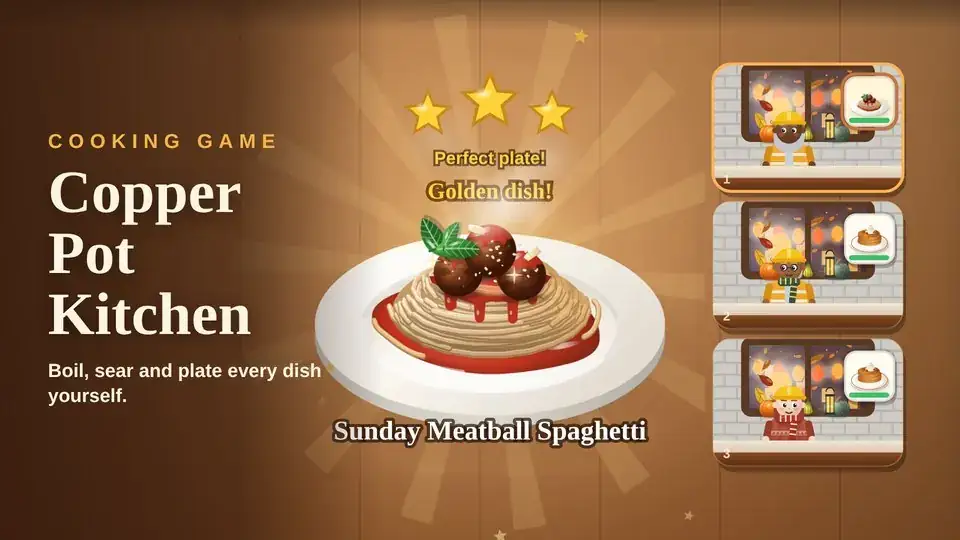
We wanted good cooking to be something we can see. The weakest heat step now decides how a dish looks. Taken off too soon, it is pale. Cooked well, it is golden. Too far, it is dark with flecks of char. A three star dish gets a shine and a curl of steam, and a one star dish looks a little tired. When the dish is revealed, a row of dots shows each step: gold for perfect, silver for good, grey for an oops. Order tickets now hang on a brass rail under each guest on a phone, and on a tablet or computer the recipe steps and the shift's running tally sit beside the stove.
Guests worth cooking for
Every dish now shows the tip its stars earned right beside the guest, and from the second shift each shift gets a grade from A to D. Regulars who keep coming back earn hearts, bronze, silver and gold, and each heart gives them a little more patience and better tips. A gold regular often asks for their favorite dish. From the fourth shift, the last guest of the night orders the longest dish on the menu and pays double, and every so often a food critic sits down; three stars for a critic wins a ribbon that raises tips for the next three shifts.
The stove brings a little juggling. A step that cooks by itself, like baking or simmering, can be left on the stove while we start another order. A bell rings when it is ready and the ticket glows gold. Bring it back in time and the step is perfect; leave it too long and it overcooks.
A clear next step
After three shifts, the big button on the kitchen screen becomes the next level of the Chef's Trail, with its goal written underneath, such as serving six guests. Each trail result leads straight on to the next level, while the plain shift stays right below for anyone who just wants to cook.
What we kept the same
Every save made before the update loads as it was. No recipe was removed or renamed, the Daily menu is identical on any date, and the relaxed kitchen, Little Chef and all seven languages work as before. The new cooking looks and grades only add to what a player already earned.