Games / Learning Games / Code Critter / Guide
Code Critter
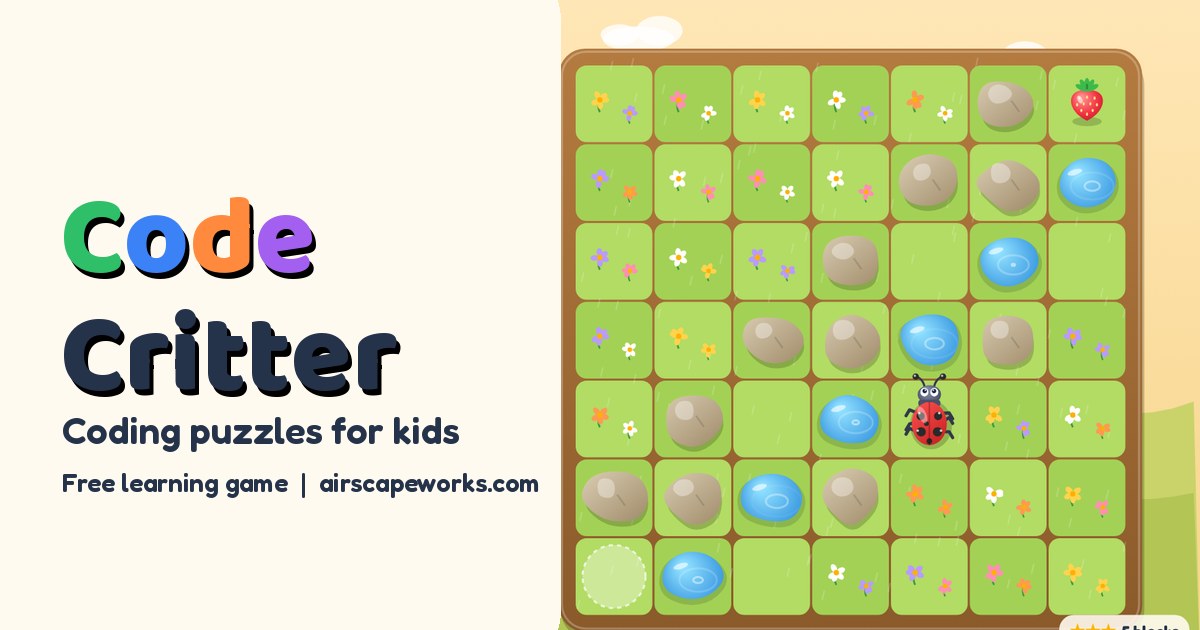
Bit is a little robot beetle who loves berries but only moves when told exactly how. Your child builds a program from arrow blocks, presses Go, and watches Bit follow it step by step. When Bit bonks into a rock, that's the start of the most useful skill in coding: figuring out why.
What your child learns
Code Critter teaches the same ideas as early computer science lessons in school, with blocks instead of typing:
- Sequencing. Steps run in order, one at a time. Forward, forward, turn left is not the same as turn left, forward, forward.
- Left and right from someone else's view. When Bit faces down the screen, Bit's left is your right.
- Debugging. Some levels start with a program that almost works. Your child runs it, sees where Bit goes wrong, and fixes that block.
- Loops. A repeat block runs the blocks inside it again and again, so 6 forwards become one block.
- Conditionals. An if block looks ahead: if there's a puddle, jump, otherwise go forward.
- Planning. Shorter programs earn more stars, which nudges kids to look for the pattern instead of tapping forward ten times.
How it works
Each level is a small garden grid with Bit, one or more berries, and things in the way: rocks to walk around and puddles to jump over. Your child taps blocks from the palette to add them to the program, then presses Go!. Bit walks the program while the running block lights up, and a repeat block shows its count, like "3 of 6". The step button runs one block at a time.
If something goes wrong, Bit says what happened: "Bonk! A rock is in the way. Bit was facing right," or "Splash! Bit cannot swim." The block that caused it gets a red outline and wiggles.
There are 32 levels in four worlds of 8:
| World | New idea |
|---|---|
| 1. Sunny Sprouts | Forward, turn left, turn right |
| 2. Puddle Pond | Jump, plus fix-the-bug levels |
| 3. Loop Lawn | Repeat blocks (tap the number to change it) |
| 4. Moonlight Maze | If blocks that check for a puddle or a wall ahead |
Levels and how it adapts
Each level shows a goal, such as "★★★ 5 blocks". Matching that number earns 3 stars, using up to 2 more blocks earns 2, and any working program earns at least 1. Every goal was checked with a computer solver, so 3 stars always means the shortest program that works.
Help arrives a little at a time. After 2 runs that don't work, glowing dots appear on the grid along the path Bit should take. After 3, the light bulb button lights up. On a debugging level it first points at the block that's wrong; after that, it can show a full working program. A level solved with that help earns 1 star, and the game offers a twin puzzle: the same idea flipped like a mirror, for your child to solve alone.
The age buttons on the title screen set the starting point. 4 to 6 starts in Sunny Sprouts with picture-only blocks, says each block's name out loud, and runs Bit a bit slower. 6 to 8 opens the first two worlds and 8 to 11 the first three. Any world also opens after 6 levels in the world before it. Each world begins with an easy level that introduces its new block.
Shells, stickers and Today's Garden
Stars unlock new shells for Bit, from Lime at 5 stars to Ladybug, Galaxy and Rainbow, and a Golden shell for collecting all 96 stars. Stickers go into the Sticker Book shared by all our learning games: one for the very first program, one for finishing each world, and one for 3 stars on every level of a world. Today builds a new garden puzzle each day that is the same for everyone, with a streak flame, and finishing it earns a sticker too.
Tips for grown-ups
- Play robot at home. Give step by step directions to the kitchen (forward 3, turn left), then swap roles and follow your child's program exactly, bonks and all.
- When Bit goes the wrong way, ask "Which block was running when it went wrong?" before fixing anything. That question is the heart of debugging.
- Point out loops in daily life: brushing teeth is "repeat 20 times: brush".
- Talk through if blocks with real choices: if it's raining, take a coat, otherwise take a hat.
Privacy and safety
Code Critter has no ads, no accounts, no chat and no tracking, and nobody types a name. Stars, shells and stickers are saved only on your device, and the only links go to our other learning games and the Sticker Book.
Questions
What age is Code Critter for?
Ages 5 to 10. A 5 year old can handle Sunny Sprouts with a grown-up nearby. Loops and if blocks fit kids around 7 to 10.
Does my child need to read to play?
No. Blocks are arrows and pictures, and on the 4 to 6 setting every block name and tip is spoken. Older kids will get more from the written tips.
Is this real coding?
Yes, in the way that matters at this age. Kids write a sequence of instructions, run it, see the result and fix it, using the same loop and if ideas found in every programming language.
Is Code Critter free?
Yes. It plays free in the browser on phones, tablets and computers, with no download, no ads and no in-app purchases.